
Best AI Workflow Automation Tools 2026: 20 Platforms Ranked — Save 60% Time, Cut Costs in Half
The global workflow automation market will reach $19.6 billion by 2026 — up from $13 billion in 2022. That is not a trend. That is a structural shift. Businesses that figure out AI workflow automation this year will operate with a permanent competitive advantage over those that don’t. Businesses that ignore it will spend the next decade playing catch-up.
Here is what the data actually says: 77% of businesses now use automation to standardize daily workflows. AI-driven automation can increase productivity by up to 40% and reduce operational costs by 20–30%. The insurance sector alone saw AI automation adoption jump from 8% to 34% in a single year — a 325% year-over-year increase. And according to NVIDIA’s 2026 State of AI report, 42% of companies say optimizing AI workflows is their top spending priority this year.
The problem? Most guides to “AI workflow automation” are either vendor-sponsored listicles or outdated overviews that confuse traditional RPA with modern agentic automation. This TOP AI workflow automation tools guide is neither. It covers the 20 most impactful AI workflow automation tools available in April 2026, with honest comparisons, real pricing, and a clear decision framework for every budget and technical level. We draw on testing data from AllAboutAI, n8n’s platform comparisons, Gumloop’s independent benchmarks, PwC’s 2026 AI predictions, and IBM’s ROI research.
What AI Workflow Automation Actually Means in 2026
In 2020, workflow automation meant “if this happens, trigger that action.” Zapier, Make, and IFTTT dominated because connecting apps through simple triggers was genuinely useful. The intelligence was zero — just rule-based routing.
In 2026, the definition has fundamentally changed. Modern AI workflow automation platforms do five things that traditional automation cannot:
- Understand unstructured inputs — process emails, PDFs, voice memos, images, and video without requiring structured data
- Make contextual decisions — handle exceptions, edge cases, and ambiguous instructions that would break rule-based systems
- Orchestrate multi-agent pipelines — coordinate multiple AI models simultaneously, routing tasks to the best model for each sub-task
- Learn from feedback — improve workflow performance over time based on outcomes and corrections
- Act autonomously over long horizons — execute multi-step tasks that span hours or days without human intervention at each step
This shift from “triggers and actions” to “perceive, reason, and execute” is what makes 2026 qualitatively different. Gartner projects that by the end of 2026, 40% of enterprise applications will include task-specific AI agents — up from near-zero in 2024. The question is no longer whether to automate. It is which platform to build on.
The latest AI models powering these workflows are themselves becoming dramatically more capable. The best AI chatbots and models of 2026 — including Claude Opus 4.6, GPT-5.4, and the freshly-released Gemma 4 — are increasingly being embedded directly into automation platforms as reasoning engines. This means the workflow tools and the AI models they use are co-evolving at an unprecedented pace. For a full review of the models that power these workflows, see our best AI tools 2026 guide.
The 5 Categories of AI Workflow Automation in 2026
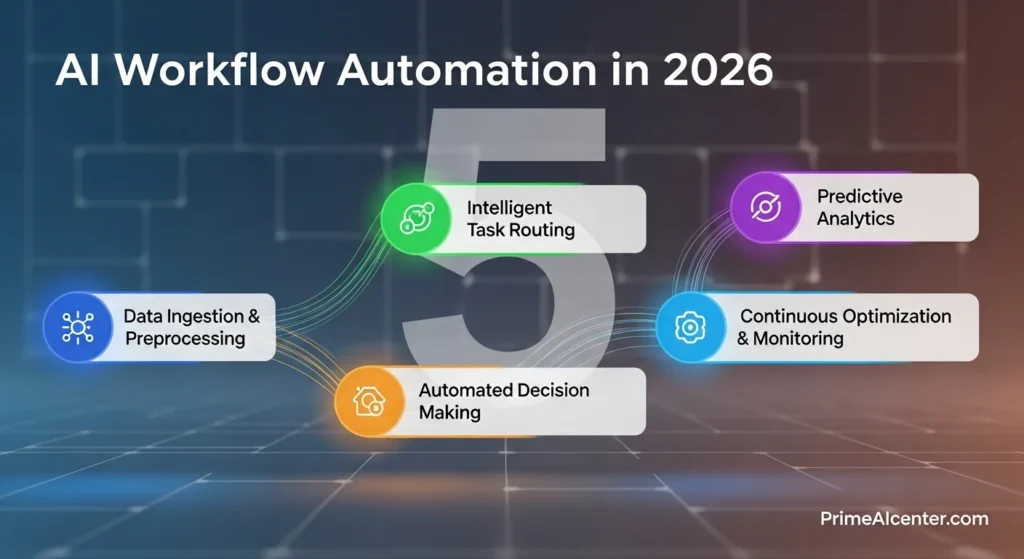
Before comparing tools, understand the five categories. Every platform on this list fits primarily into one:
| Category | Description | Best For | Leading Tools |
|---|---|---|---|
| No-Code Automation | Visual trigger/action builders with AI steps | Non-technical teams, SMBs | Zapier, Make, Relay.app |
| Low-Code / Developer | Visual builders with code fallback + self-hosting | Technical teams, startups | n8n, Gumloop, Pipedream |
| AI Agent Builders | Create autonomous AI employees with goals | Sales, support, operations | Lindy, Relevance AI, Vellum |
| Enterprise iPaaS | Enterprise-grade orchestration with compliance | Large organizations, regulated industries | Workato, Microsoft Power Automate, UiPath |
| Specialized/Vertical | Purpose-built for specific domains | Marketing, DevOps, creative workflows | AirOps, Adobe Sensei, Dify.ai |
The 20 Best AI Workflow Automation Tools of 2026
🥇 1. n8n — Best Overall for Technical Teams
Best for: Developers, startups, and technical teams who need maximum flexibility without vendor lock-in.
Pricing: Free (self-hosted) | Cloud from $24/month | Enterprise custom
G2 Rating: 4.8/5 (131 reviews) | Capterra: 4.6/5
n8n is the undisputed leader for teams that need real power without sacrificing control. It is open-source (source-available), self-hostable on your own infrastructure, and offers 400+ native integration nodes plus unlimited custom integrations via HTTP requests. Critically, it includes full JavaScript and Python code execution within workflows — meaning any logic you can write in code, you can embed in a workflow. No other platform at this price point matches that flexibility.
The AI capabilities are genuinely impressive. n8n includes approximately 70 dedicated AI/LangChain nodes, making it the most AI-native of the traditional automation platforms. You can orchestrate multi-agent pipelines, connect directly to OpenAI, Anthropic, or any LLM, and build RAG (retrieval-augmented generation) workflows without custom code. The n8n community has produced over 5,000 workflow templates, including automated social media posting, sales prospect research, meeting briefing generators, and competitor analysis workflows.
The honest limitation: n8n assumes technical comfort. If your team has never managed a server or written a line of code, the learning curve is steep. The cloud version reduces this, but the full power only emerges with self-hosting. For pure no-code teams, see Zapier or Lindy below.
🥈 2. Zapier — Best for Non-Technical Teams and Broad Integrations
Best for: Non-technical teams who need quick automation across popular SaaS tools.
Pricing: Free (limited) | Starter $20/month | Professional $50/month | Team from $70/month
G2 Rating: 4.5/5 (1,923 reviews) | Capterra: 4.7/5
Zapier is the entry point for most teams exploring automation. It connects over 7,000+ apps — the largest integration library of any automation platform — and has been reliable for over a decade. In 2026, Zapier added AI Copilot features including natural language workflow creation: describe what you want automated and Zapier drafts the workflow. It also added Zapier Agents, which handle multi-step autonomous tasks, and Zapier Tables for lightweight databases within workflows.
The trade-off is depth versus breadth. Zapier excels at simple to moderately complex automations — the kind where “if this email arrives, add this row to Google Sheets and send a Slack notification.” Where it struggles is complex branching logic, multi-agent orchestration, and high-volume workflows where per-task pricing compounds quickly. According to AllAboutAI’s 2026 platform test, 60% of Zapier users see ROI within 12 months — the highest among all platforms tested.
🥉 3. Make (formerly Integromat) — Best for Complex Logic at Lower Cost
Best for: Operations teams who need sophisticated branching and data transformation at half the price of Zapier.
Pricing: Free (1,000 ops/month) | Core $10.59/month | Pro $18/month | Teams $34/month
G2 Rating: 4.7/5 (251 reviews) | Capterra: 4.8/5
Make’s visual scenario builder is the most powerful purely visual automation tool available. Its canvas allows complex multi-path workflows with conditional routing, error handling, iterators, aggregators, and data transformation that would require developer-level skills in Zapier. If your workflow looks like “if the lead score is above 80 AND the company has more than 50 employees AND the contact is in the US, then do this chain of actions — otherwise route to this separate pipeline” — Make handles it elegantly. Zapier would require multiple Zaps, workarounds, and Paths add-ons.
The 2026 updates added AI-powered scenario builder: describe your workflow in natural language and Make generates the first version. This significantly reduces setup time for complex scenarios. Make also connects to over 1,500 apps, which is smaller than Zapier’s 7,000+ but covers virtually every tool that matters for professional use cases.
4. Lindy AI — Best AI-Native Agent Builder
Best for: Teams wanting genuine AI employees that operate autonomously across email, sales, and support.
Pricing: Free (400 credits/month) | Pro $49.99/month | Business $199.99/month
G2 Rating: 4.9/5 (170 reviews)
Lindy is the platform where “AI workflow automation” starts to look less like automation and more like delegation. You create “Lindies” — AI agents with goals, context, and instructions — rather than trigger/action sequences. A Lindy can manage your inbox (reading, categorizing, drafting responses, escalating only what truly needs human attention), qualify leads (searching LinkedIn, researching companies, personalized outreach), or run a customer support operation (answering questions, routing complex issues, logging in CRM).
The 2026 addition of Gaia — an AI phone agent powered by Deepgram — extends this into voice. A Lindy can now schedule calls, handle inbound inquiries, and follow up on sales calls entirely through phone interaction. For small businesses and solopreneurs, this is a genuine breakthrough in operational leverage. Lindy’s HIPAA-compliant healthcare notetaker is also worth noting for medical practices. For more on how AI agents work at this level, our complete AI agent guide explains the architecture.
5. Gumloop — Best No-Code Platform for AI-First Workflows
Best for: Technical marketers and growth teams building LLM-powered automations visually.
Pricing: Free plan | Paid from $97/month
Funding: $20M raised
Gumloop occupies a unique position: more powerful than Lindy for complex data pipelines, more accessible than n8n for non-developers. Its modular “node” architecture lets you compose workflows from building blocks — web scrapers, LLM processors, data transformers, API connectors — without writing code. The model-agnostic architecture lets you route tasks between GPT-4, Claude, and Gemini within a single workflow, comparing outputs or using different models for different sub-tasks.
Templates worth highlighting: internal linking opportunity finder (great for SEO workflows), legal contract analyzer, and competitive intelligence generators. Gumloop’s 90+ pre-built templates cover the most common AI-powered content and research workflows. For teams building AI content workflows, this connects naturally with our guide on best AI tools for content creators.
6. Relevance AI — Best for No-Code Agent Teams
Best for: Operations and marketing teams wanting to build and manage teams of AI agents without coding.
Pricing: Free tier available | Paid plans vary by usage
Relevance AI takes the “AI employee” concept furthest. Instead of workflows, you build agents with roles. You describe the job — “you are a competitive intelligence analyst who monitors our competitors’ websites, summarizes new content, and delivers a weekly brief” — and Relevance generates the agent. You then connect tools (Google Search, Slack, HubSpot) and chain agents together into “Agent Teams” that handle end-to-end processes.
The natural language agent generation makes setup dramatically faster than any code-based alternative. The open-endedness creates a higher learning curve than Lindy — but also more flexibility for complex, custom processes. Best for operations leaders who think in terms of “hiring” rather than “programming.”
7. Microsoft Power Automate — Best for Microsoft 365 Teams
Best for: Organizations already in the Microsoft ecosystem who want AI automation within Office 365, Teams, and Azure.
Pricing: Per-user plan $15/month | Per-flow plan $500/month | Included with Microsoft 365 Business Premium
For teams running Microsoft 365, Power Automate is often the lowest-friction path to workflow automation — it is already included in many Microsoft licenses. The 2026 Copilot integration adds AI authoring: describe what you want to automate in natural language and Copilot generates the flow. Power Automate also uniquely supports desktop flows (RPA) — automating legacy desktop applications like old ERP systems that have no API. No other tool on this list handles that reliably.
The limitation is ecosystem lock-in. Power Automate works best when everything is in Microsoft’s world. Mixed-stack teams (using Notion, Linear, Loom, HubSpot alongside Office) will find it awkward. Cross-platform teams should evaluate n8n or Make instead.
8. Workato — Best Enterprise Automation Platform
Best for: Large enterprises needing SOC 2 Type II compliance, RBAC governance, and orchestration across hundreds of systems.
Pricing: Enterprise (contact for pricing)
Workato is the platform for enterprises where compliance is not optional. SOC 2 Type II certified, comprehensive role-based access controls, centralized governance across business units, and guaranteed SLAs. It bridges simple app triggers with deep IT infrastructure, handling legacy systems, SAP integrations, and complex data orchestration that enterprise businesses actually face.
The “Recipe IQ” feature uses machine learning to suggest optimal workflow steps based on millions of successful automations across Workato’s enterprise customer base. For regulated industries (finance, healthcare, insurance), Workato’s compliance posture is worth the premium price. Canva, Autodesk, and Rakuten are among the enterprises in Workato’s customer base.
9. Pipedream — Best for API-First Developers
Best for: Developers building production-grade automations with server-side code and complex API orchestration.
Pricing: Free tier | Paid from $19/month
Pipedream is code-first where n8n is code-fallback. Every step can contain server-side JavaScript or Python, with full npm package support. It connects to over 2,800 APIs via its MCP server, and 10,000+ tools are available. For developers building automation into their products (not just internal tooling), Pipedream’s API-first design and serverless runtime makes it the strongest technical choice. The 2026 MCP integration means Pipedream can now act as an orchestration layer for AI agents across multiple providers.
10. Vellum AI — Best Enterprise AI Agent Platform
Best for: Engineering teams building production LLM applications with monitoring, evaluation, and observability.
Pricing: Free tier | Paid from $25/month | Enterprise custom
Funding: $25.5M raised
Vellum occupies the enterprise end of the AI-native automation market. It provides an end-to-end platform for building, testing, versioning, and monitoring AI pipelines in production. The eval framework is particularly strong — you can A/B test different prompts and models, track performance over time, and get alerts when output quality degrades. Used by Redfin, Ogilvy, Brilliant, and Ashby for production AI workflows. The fastest way for non-technical teams to start: prompt Vellum in natural language with what you want to automate and it generates the first agent version.
11. Relay.app — Best for Human-in-the-Loop Workflows
Best for: Teams who need AI automation with built-in approval steps and human oversight at critical decision points.
Pricing: Free plan | Starter from $9/month
Relay.app fills a specific gap: what happens when you need AI to handle 90% of a workflow but human judgment at one or two critical points? Most automation platforms force an all-or-nothing choice: either fully automate or manually do everything. Relay enables hybrid workflows where AI handles data gathering, drafting, and initial decisions, then pauses for human review before taking consequential actions. Used by Cursor, Ramp, and Motion teams.
12. Lindy AI Voice (Gaia) — Best for Phone and Voice Automation
Part of Lindy’s Pro/Business plan ($49.99–$199.99/month)
Voice automation is the emerging frontier for 2026. Gaia — Lindy’s AI phone agent — can handle inbound calls, schedule outbound calls, qualify leads through conversation, and log everything in your CRM automatically. For medical practices (HIPAA-compliant), appointment scheduling can be fully automated. For sales teams, inbound qualification never misses a call. This is the practical implementation of voice AI that connects to our analysis of New Siri iOS 26 and what voice AI can do.
13. Dify.ai — Best Open-Source LLM Application Builder
Best for: Developers building LLM-powered applications and chatbots with visual workflow composition.
Pricing: Open-source (self-hosted free) | Cloud from $59/month
Dify.ai is the open-source answer to LLM application development. Build RAG pipelines, chatbots, and agentic workflows visually, then deploy to production with one click. It supports every major LLM (GPT, Claude, Gemini, Llama 4, and local models including Gemma 4 via Ollama). The workflow builder is specifically designed for LLM orchestration — handling prompt templates, context management, and multi-step reasoning chains that standard automation tools handle awkwardly.
14. UiPath — Best for Enterprise RPA + AI
Best for: Large enterprises with legacy desktop applications requiring robotic process automation augmented by AI.
Pricing: Enterprise (contact for pricing)
UiPath combines traditional RPA (automated screen clicks, form filling, data extraction from legacy systems) with modern AI capabilities. For enterprises where a critical workflow involves a desktop application from 2008 with no API, UiPath handles what no other platform can. Healthcare referral processing, insurance claims, and university student onboarding are use cases where UiPath operates where other platforms cannot reach.
15. AirOps — Best for AI-Powered Marketing Workflows
Best for: Marketing teams building AI-powered content pipelines, SEO workflows, and campaign automation.
Pricing: Starter $49/month | Growth $299/month | Enterprise custom
AirOps is purpose-built for marketing teams who need AI automation across content creation, SEO research, and campaign execution. It connects directly to major data sources (Ahrefs, SEMrush, Google Search Console, HubSpot) and uses AI to automate the research, drafting, and optimization steps that currently consume hours of human time. For content teams and SEO agencies, AirOps is the highest-ROI specialist tool on this list. For a full content creation automation stack, see our AI tools for content creators guide.
16. LangChain + LangFlow — Best for Custom AI Agent Engineering
Best for: Engineering teams building custom LLM-powered agents with full control over every component.
Pricing: Open source (free self-hosted) | LangSmith cloud from $39/month
LangChain is the foundational framework for building custom AI agents, RAG systems, and multi-agent orchestration. LangFlow provides a visual interface on top of LangChain’s Python framework. Together they are the most powerful combination for engineering teams that need to go beyond what any commercial platform offers. The trade-off is significant: you are building infrastructure, not using a product. Expect weeks of setup time versus hours for Lindy or Make. Worth it for teams building AI capabilities as a competitive differentiator. Connects naturally with the MCP protocol for AI-to-tool connections.
17. VectorShift — Best for Multi-LLM Orchestration
Best for: Technical teams building complex pipelines across multiple LLM providers.
Pricing: Paid plans from $25/month
Funding: $3.5M
VectorShift bridges no-code visual building with developer-level programmability via Python SDK. Its unique strength is LLM agnosticism: you can build workflows that route between OpenAI, Anthropic, HuggingFace, and Mistral within a single pipeline, comparing outputs or using different models for different steps. Voice bot building is also supported — useful for sales, support, and healthcare call center automation.
18. Adobe Sensei — Best for Creative and Marketing Automation
Best for: Creative teams already using Adobe Creative Cloud or Experience Cloud.
Pricing: Included with Adobe Creative Cloud, Experience Cloud, or Document Cloud plans
Adobe Sensei powers AI automation across the entire Adobe product suite — Creative Cloud (Photoshop, Premiere, After Effects), Experience Cloud (AEM, Analytics), and Document Cloud (Acrobat). For teams already paying for Adobe, Sensei delivers image tagging automation, content generation, marketing personalization, and predictive analytics at no additional cost. L’Oréal uses Adobe’s AI tools to adapt visual assets across social platforms and regional markets, significantly reducing production cycles in 2026.
19. Activepieces — Best Open-Source Zapier Alternative
Best for: Teams wanting Zapier-style simplicity with self-hosting and no per-task pricing.
Pricing: Open source (free self-hosted) | Cloud from $19/month
Activepieces is the most approachable open-source automation tool. The drag-and-drop interface is genuinely comparable to Zapier in ease of use, but with the full data control of self-hosting. 200+ native integrations cover most common SaaS tools. For privacy-conscious teams or organizations that cannot use cloud-based automation tools for compliance reasons, Activepieces is the strongest no-code option.
20. Apache Airflow — Best for Data Engineering Workflows
Best for: Data engineering teams scheduling, monitoring, and orchestrating complex data pipeline workflows.
Pricing: Open source (free self-hosted) | Managed cloud options vary
Apache Airflow is the standard for data pipeline orchestration. If your workflow involves moving large datasets between systems, scheduling ETL jobs, or monitoring multi-step data transformations across AWS, GCP, and Azure, Airflow handles it reliably. It is Python-based and code-first — not appropriate for non-technical users — but for data teams, it is the most battle-tested option available. Plug-and-play operators for all major cloud providers are included.
Head-to-Head Comparison: The 8 Most Popular Platforms
| Platform | Best For | Technical Level | AI Native? | Self-Host? | Starting Price | Integrations | Agent Support |
|---|---|---|---|---|---|---|---|
| n8n | Developers | Medium-High | Yes (70 AI nodes) | ✅ Yes | Free | 400+ | Full |
| Zapier | Non-technical | Low | Partial | ❌ No | $20/mo | 7,000+ | Basic |
| Make | Complex logic | Low-Medium | Partial | ❌ No | $10.59/mo | 1,500+ | Basic |
| Lindy AI | AI employees | Low | ✅ Fully | ❌ No | $49.99/mo | 4,000+ | Full |
| Gumloop | LLM pipelines | Medium | ✅ Fully | ❌ No | $97/mo | 90+ templates | Full |
| Relevance AI | Agent teams | Low-Medium | ✅ Fully | ❌ No | Usage-based | Custom | Full |
| Power Automate | Microsoft 365 | Low-Medium | Partial (Copilot) | ❌ No | $15/user/mo | 1,000+ | Basic |
| Workato | Enterprise | Medium | Partial | ❌ No | Enterprise | 1,200+ | Advanced |
How to Choose: The Decision Framework
The best AI workflow automation platform depends on three variables: your technical capacity, your primary use case, and your budget. Here is the decision tree:
Step 1: Assess Technical Capacity
- No technical team, no coding: Start with Zapier (broadest integrations) or Lindy (most AI-native for agents)
- Some technical understanding, no dedicated developer: Make for complex logic, Gumloop for AI pipelines, Relay.app for human-in-the-loop
- Dedicated developer or engineering team: n8n for maximum flexibility, Pipedream for API-first, LangChain for custom agents
- Enterprise IT department: Workato for compliance, Microsoft Power Automate for Microsoft 365, UiPath for legacy RPA
Step 2: Identify Primary Use Case
- Sales and CRM automation: Lindy (email, outreach, lead qualification) or Zapier (CRM integrations)
- Customer support automation: Lindy (AI agent), Relevance AI (agent teams), Intercom (chat)
- Content and marketing workflows: AirOps, n8n, Gumloop
- Developer/coding workflows: n8n, Pipedream, LangChain — or check our best AI coding assistant guide
- Data pipelines: Apache Airflow, n8n
- Voice/phone automation: Lindy Gaia, VectorShift
- Creative production: Adobe Sensei
Step 3: Calculate Budget Impact
| Monthly Budget | Best Starting Point | Expected Outcome |
|---|---|---|
| $0 (free only) | n8n self-hosted or Zapier free | Basic automation of 5–10 workflows |
| $10–50/month | Make ($10.59) or Zapier Starter ($20) | 100–1,000 workflow runs/month |
| $50–100/month | Lindy Pro ($49.99) or n8n cloud | Full AI agent with email/sales automation |
| $100–200/month | Gumloop ($97) or Lindy Business | Complex AI pipelines, multi-agent workflows |
| $200+/month | Relevance AI, Vellum, or AirOps | Enterprise-grade agent teams |
| Enterprise | Workato, UiPath, or Power Automate | SOC 2 compliance, RBAC, guaranteed SLAs |
Real-World AI Workflow Automation Use Cases

Use Case 1: Automated Lead Research and Outreach (Sales Team)
Tools: n8n or Lindy + HubSpot + LinkedIn + OpenAI
A new lead submits a form. The workflow automatically: pulls LinkedIn profile data, searches company news in the last 30 days, generates a personalized email referencing specific company context, schedules the email for optimal send time, logs all activity in HubSpot. Total human time: reviewing the final draft (2 minutes). Previous human time: 25–35 minutes per lead. ROI at 100 leads/month: 35–55 hours saved.
Use Case 2: AI-Powered Content Production Pipeline (Content Team)
Tools: AirOps or n8n + Claude Code + SEO tools
Content brief approved by editor. Workflow triggers: keyword research automatically pulled from Ahrefs, competitors’ articles fetched and summarized, AI generates first draft structured for SEO, images selected from library using visual AI, metadata generated, draft posted to CMS for human review. Human time: editing the AI draft (45 minutes vs. 4+ hours for full article from scratch). For the models powering these content workflows, our AI tools for content creators guide covers the full stack.
Use Case 3: Customer Support Deflection (Support Team)
Tools: Lindy or Relevance AI + Zendesk + knowledge base
Every support ticket automatically gets: classified by urgency and type, searched against knowledge base for existing answers, AI-drafted response generated with sources, routing decision made (auto-reply vs. human escalation). Only truly complex or sensitive tickets reach human agents. Real case: BakerHostetler law firm reduced research hours by 60% using AI-powered legal research automation. For WhatsApp-based customer automation specifically, our WhatsApp AI agents guide covers the full implementation.
Use Case 4: Competitive Intelligence Monitoring
Tools: n8n + Gumloop + Perplexity API
Daily automated sweep: competitor websites checked for new content, pricing pages monitored for changes, industry news summarized from 20+ sources, mentions across social media aggregated, weekly brief generated and emailed to leadership. Manual equivalent: 3–4 hours per week per analyst. With automation: 10-minute human review of the AI-generated brief.
The ROI Reality: What the Data Actually Shows
The marketing around AI workflow automation is full of inflated claims. Here is what independent research actually shows for 2026:
| Metric | Finding | Source |
|---|---|---|
| Productivity increase | 40% for teams with deployed automations | Industry analyst data, 2026 |
| Cost reduction | 20–30% operational cost savings | Multiple platform benchmarks |
| Manual task hours reduced | 73% of IT leaders report 10–50% reduction | Smartflow ROI analysis |
| Employee satisfaction | 93% of employees using automation tools more satisfied with productivity | Salesforce study |
| Development cost reduction | 30–50% via low-code/no-code platforms | Platform benchmark data |
| Open-source savings | Up to 70% software bill reduction | Workflow automation market research |
| AI assistants on support tickets | $150,000/year saved for 500 tickets/month | Smartflow case study |
| Organizations achieving strong ROI | Only ~25% of AI initiatives deliver expected ROI (yet) | IBM CEO study |
The last stat deserves emphasis: only 25% of AI initiatives deliver expected ROI. IBM’s research attributes this not to technology failure but to organizational factors: culture, governance, workflow design, and data strategy. The technology works. The implementation is where most organizations fail. Starting with a narrow, high-impact pilot workflow — rather than trying to automate everything at once — is the consistently recommended approach from PwC, McKinsey, and IBM research alike.
The organizations achieving transformative results share one pattern: they treat automation as business process redesign, not task replacement. The question is not “how do we automate what we currently do?” It is “what would we do differently if we had unlimited intelligent capacity?” Those are fundamentally different questions with fundamentally different ROI outcomes.
AI Workflow Automation and the Models That Power It
The capabilities of these automation platforms are directly tied to the AI models they embed. As frontier models improve, the automation platforms that integrate them become dramatically more powerful. Three current developments are particularly relevant for 2026:
Claude Opus 4.6 and Claude Code — Anthropic’s models power many production automation workflows through their MCP (Model Context Protocol) integration. Any automation platform supporting MCP can connect to hundreds of tools through Claude’s standardized interface. See our Kilo Code review and best AI coding assistant guide for coding-specific workflow automation.
GPT-5.4’s computer use capability — At 75% on OSWorld benchmarks (exceeding the 72.4% human expert baseline), GPT-5.4 can now operate desktop applications through automation workflows. This extends automation to legacy systems with no API. Our GPT-5.5 (Spud) review covers what the next generation will bring to automation capabilities.
Local model deployment (Gemma 4, DeepSeek V4) — Teams with data privacy requirements can now run frontier-quality AI locally via Ollama and connect those models to automation workflows. This removes the data residency objection that previously blocked AI automation in regulated industries. Our Gemma 4 complete guide covers the hardware and setup required for local AI in workflows.
The upcoming releases — GPT-5.5 (Spud), DeepSeek V4, and eventually Claude Mythos — will further expand what these platforms can do. Our DeepSeek V4 review and Claude Mythos review track those developments. For enterprise deployment architecture, our enterprise AI agent deployment guide covers governance and rollout patterns.
Getting Started: Your First AI Workflow in 30 Minutes
Theory is worthless without action. Here is the fastest path to a working AI automation:
Day 1 (30 minutes): Build one high-impact workflow
Pick the most repetitive task your team does. Common highest-ROI starting points: email triaging and drafting, meeting summary generation, or lead research. Sign up for Zapier (if non-technical) or n8n cloud (if technical). Use the AI Copilot/natural language builder to describe the workflow. Test on 5 real examples. Approve.
Week 1: Measure baseline and iterate
Track time saved per instance. Document what the AI gets wrong. Adjust the prompt or workflow logic. Most first-version workflows need 2–3 iterations before they are production-ready.
Month 1: Expand to connected workflows
Once the first workflow is stable, find the next-highest-impact task. The compound effect of chained automations is where the 40% productivity gains emerge — not from any single workflow but from the accumulated effect of 5–10 automations running simultaneously.
For solopreneurs starting this journey, our best AI tools for solopreneurs guide covers the most practical starting stack. For teams looking to monetize their automation expertise, our guide to making money with AI covers the agency and freelancing opportunities. For GEO optimization of content that AI automation helps produce, our GEO optimization guide and GEO ranking techniques cover making AI-produced content visible in AI search.
Frequently Asked Questions
What is AI workflow automation?
AI workflow automation uses artificial intelligence to execute multi-step business processes with contextual decision-making, not just rule-based triggers. Unlike traditional automation (if X, do Y), AI automation handles exceptions, processes unstructured inputs (emails, documents, images), and improves over time. In 2026, this includes agentic workflows where AI models execute sequences of tasks autonomously over extended periods.
What is the best AI workflow automation tool in 2026?
For technical teams: n8n (free, self-hostable, 70+ AI nodes, full code access). For non-technical teams: Zapier (7,000+ integrations, AI Copilot, easiest setup) or Lindy (most capable AI agent builder). For enterprises: Workato (SOC 2, RBAC, enterprise SLAs). For AI-first pipelines: Gumloop or Relevance AI.
How much does AI workflow automation cost?
From free (n8n self-hosted, Activepieces) to $10–$50/month for small teams (Make, Zapier Starter) to $49–$200/month for AI agent platforms (Lindy, Gumloop) to enterprise pricing (Workato, UiPath). The key ROI metric: a team saving just 5 hours per week at $50/hour justifies $1,000/month in tooling costs. Most platforms pay for themselves within one automated workflow.
Is AI workflow automation replacing jobs?
The data shows AI automation creates net productivity increases, not headcount reductions in most organizations. Amazon, Oracle, and Dow have announced layoffs citing AI automation — but these affect primarily middle management and administrative roles, not specialized or creative work. The 93% employee satisfaction stat from Salesforce’s research suggests that for most workers, automation of repetitive tasks improves rather than threatens their work experience. The most reliable career protection is building the skills to deploy and manage these tools, not resisting them.
Can I run AI workflow automation locally for privacy?
Yes. n8n self-hosted runs entirely on your infrastructure with no data leaving your environment. Connect it to local AI models via Ollama (Gemma 4, Llama 4, GLM-5V-Turbo) for fully private AI workflows. This approach now achieves near-frontier quality at zero ongoing model cost. See our Gemma 4 guide for local deployment details and our GLM-5V-Turbo review for visual coding automation specifically.
What is the difference between AI workflow automation and AI agents?
Workflow automation executes predefined sequences with AI steps. AI agents pursue goals autonomously, deciding their own action sequences. Most platforms now blur this line — n8n supports both, Lindy leans toward agents, Zapier leans toward workflows. The practical difference: workflows are deterministic (same input → same output path), agents are adaptive (same input → variable output path based on context). For a deep dive on agents, our complete AI agent guide covers the architecture and use cases.
How do I measure ROI from AI workflow automation?
Track four metrics: (1) hours saved per workflow per week × team hourly rate = direct labor savings; (2) error rate reduction × cost per error = quality improvement savings; (3) throughput increase (tasks completed per week before/after); (4) cycle time reduction (time from trigger to completion). IBM’s research shows 55% median ROI for product development teams following best practices — but only 25% of AI initiatives overall deliver expected ROI, primarily due to poor implementation rather than technology failure. For AI statistics and benchmarks, our AI statistics 2026 guide has the full data.
Final Verdict
AI workflow automation in 2026 is not a future capability. It is a present competitive advantage. The workflow automation market will hit $19.6 billion this year because the ROI is real: 40% productivity increases, 20–30% cost reductions, and hours of manual work eliminated every week.
The platforms that deliver this value are not uniform. The right choice depends entirely on your technical capacity, use case, and budget. For most teams, the fastest path to value is: start with Zapier or Lindy for quick wins, then graduate to n8n or Gumloop as complexity grows. For enterprises, Workato or Microsoft Power Automate provide the governance infrastructure that consumer tools lack.
The most important action is not picking the perfect tool. It is starting with one high-impact workflow this week. Every week you delay is a week competitors are automating what you are still doing manually.
Sources: Gumloop platform testing, n8n benchmark comparisons, NVIDIA State of AI 2026, PwC 2026 AI predictions, IBM AI ROI research, OneReach agentic AI stats, SHNO workflow automation statistics, 9CV9 105 AI automation statistics, AllAboutAI platform test, AI Gen Insight 24 platforms review, Hatchworks n8n vs Zapier, Lindy platform comparison, Master of Code AI ROI analysis. Updated April 7, 2026.