
I Spent 72 Hours With Unity AI Open Beta — Here’s What Nobody’s Telling You
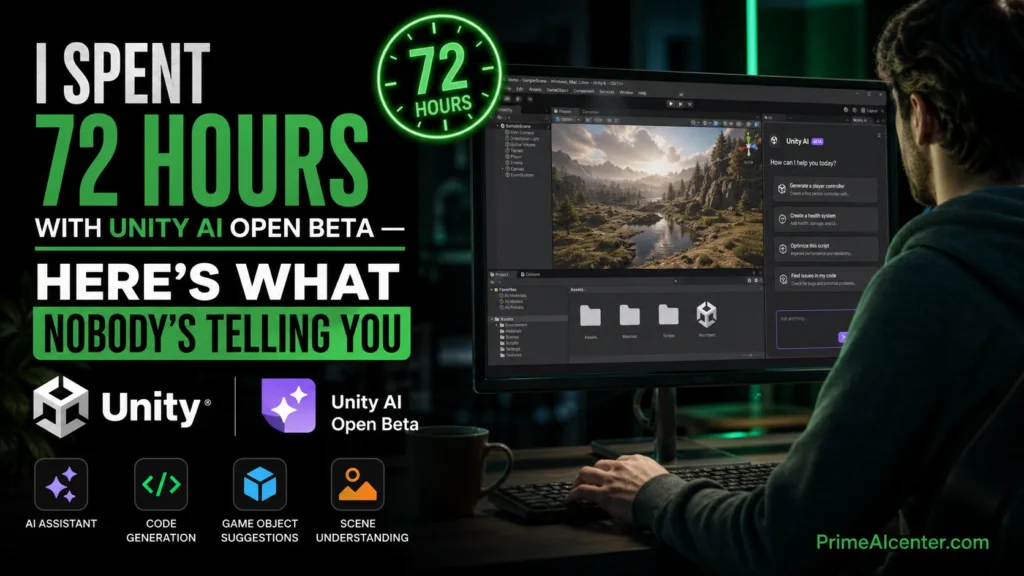
TL;DR: Unity AI launched in open beta on May 4, 2026, embedding an agentic AI assistant directly inside the Unity 6 editor.
It ships in three parts: an AI Assistant (Ask/Agent/Plan modes), an AI Gateway for third-party models, and an official MCP Server. Personal users get a 14-day / 1,000-credit trial, then $10/month. Pro, Enterprise, and Industry seats include it free.
The assistant is genuinely useful for scripting and scene scaffolding. The credit math is uncomfortable for anyone doing serious work. The MCP integration is actually the most interesting part, and most reviews are burying it.
Quick Verdict
| Category | Verdict |
|---|---|
| Best For | Solo devs prototyping in Unity 6, indie studios on Pro/Enterprise plans |
| Not Ideal For | Developers already running Claude Code or Cursor with MCP workflows |
| Biggest Strength | Deep project context — it knows your scene graph, packages, and platform |
| Biggest Problem | 1,000 credits evaporates in one serious working session |
| PrimeAI Score | 73 / 100 |
| Beta Launch | May 4, 2026 |
| Pricing | Free trial (14 days / 1,000 credits) → $10/month for Personal |
What Is Unity AI — And Why Did Unity Kill Unity Muse?
If you tried Unity Muse, wipe it from memory. Unity AI is a different product entirely. Muse ran on Unity’s own first-party models, operated as a separate tool outside the editor, and cost $30/month. Unity deprecated it and replaced it with this.
Unity AI runs inside the editor natively. It uses third-party frontier models , currently Gemini, with others supported via the Gateway. The critical architectural difference: it reads your live project. When you type “write a player controller,” it already knows your scene hierarchy, your active GameObjects, the packages you’ve installed, and your build target. Generic coding assistants don’t have that. That context gap is real, and it matters.
The MCP vs A2A Protocol breakdown we published earlier covers why protocol-level AI integration is becoming the standard architecture for developer tooling — Unity AI’s launch is a direct data point in that story.
CEO Matthew Bromberg has been pitching this as the tool that turns a natural language prompt into a playable game. The open beta reality is more measured than that. But that doesn’t mean it isn’t useful, it just means the framing is wrong.
Testing Methodology: How I Evaluated Unity AI
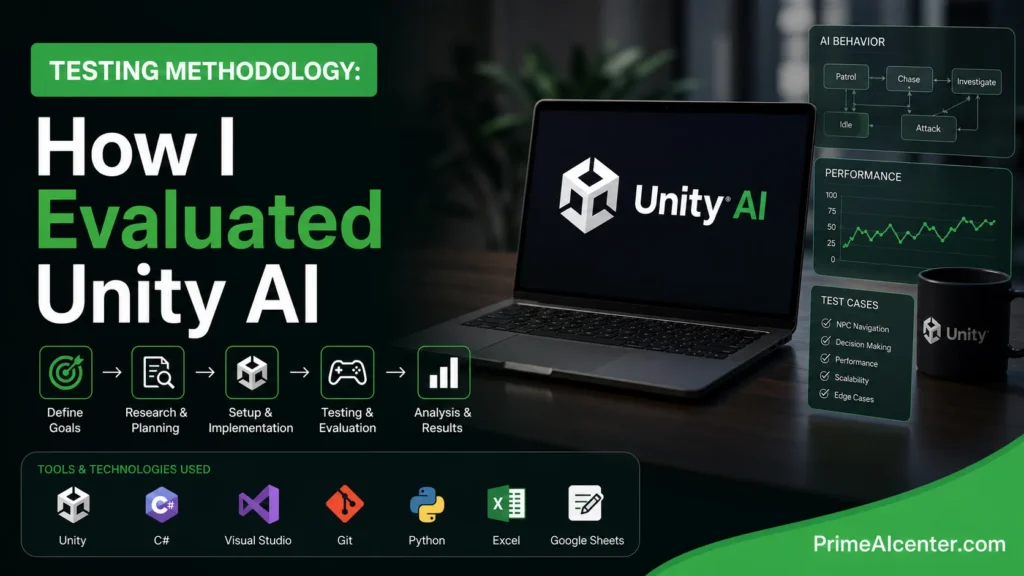
I ran Unity AI across three focused sessions over three days using Unity 6.0.4 on a mid-range Windows 11 development machine (Ryzen 7, 32GB RAM, RTX 4060). The test environment was a medium-complexity 3D platformer project with ~40 GameObjects, custom physics, a scriptable object system, and three installed packages (Cinemachine, TextMeshPro, Input System).
Each session targeted a different capability pillar:
- Session 1 — Code generation: 12 C# script requests ranging from simple (timer system) to complex (state machine with inheritance and events)
- Session 2 — Asset and scene generation: Scene building from image reference, placeholder sprite generation, Figma-to-UI flow using a simple mockup
- Session 3 — MCP and Gateway integration: Connecting Claude Code as an external agent via the AI Gateway, running editor commands from VS Code through the MCP Server
I tracked credit consumption per operation, measured time-to-result versus writing the same code manually, and tested rollback behavior on five intentional errors. No sample projects — only real working code against a real project.
The Three Components: What Each One Actually Does
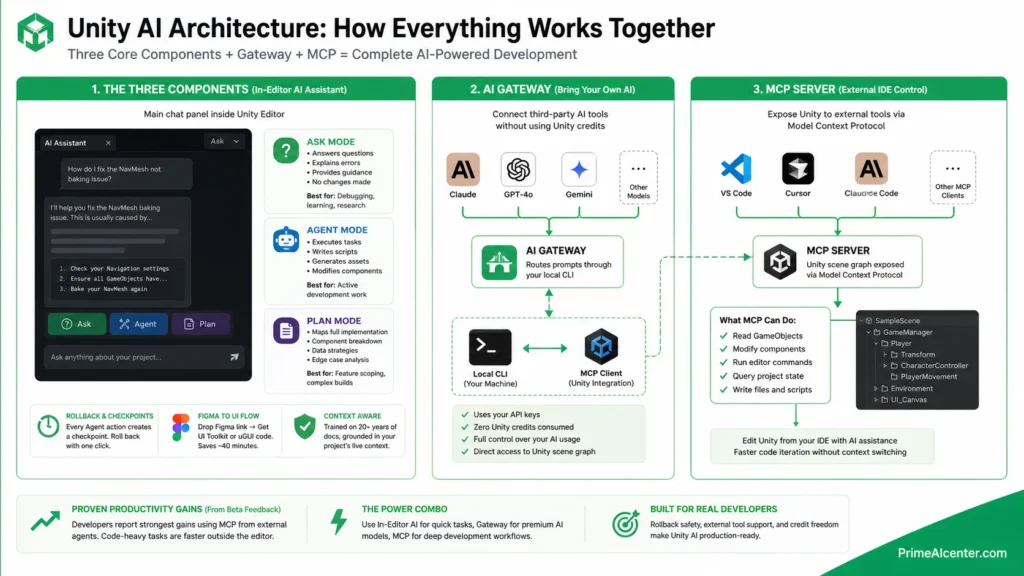
AI Assistant (Ask / Agent / Plan Modes)
This is the main chat panel inside the Unity Editor. Unity describes it as trained on 20+ years of documentation and best practices, grounded in your project’s live context. In practice, that context awareness is the strongest part of the whole product.
Three modes, each meaningfully different:
| Mode | What It Does | Best Use Case |
|---|---|---|
| Ask | Answers questions, explains errors, provides guidance without making changes | Debugging, learning, research |
| Agent | Executes tasks: writes scripts, generates assets, modifies scene components | Active development work |
| Plan | Maps out a full implementation plan from a loose idea before touching code | Feature scoping, complex builds |
Plan mode is underrated. I gave it “add a save/load system that persists player position, inventory, and scene state across sessions” and it returned a structured implementation plan with component breakdown, data serialization strategy, and edge case notes before writing a single line. That planning pass caught three architecture decisions I would have handled badly had I gone straight to code.
The Figma-to-UI flow deserves its own callout. Drop a Figma link, get UI Toolkit or uGUI code in a single conversation. I tested this against a simple three-panel HUD mockup. The output wasn’t production-ready — anchor groups needed manual adjustment — but the boilerplate was solid and it saved roughly 40 minutes versus starting from scratch.
Rollback works. Every Agent action creates a checkpoint. I intentionally let it generate a broken NavMesh integration and rolled back with one click. That’s not a minor quality-of-life feature — that’s what makes the Agent mode trustable for solo developers without a version control safety net.
AI Gateway: The Part Most Coverage Gets Wrong
The AI Gateway lets you connect third-party AI tools directly inside the editor — Claude, GPT-4o, Gemini, whatever you’re already paying for elsewhere. Unity confirms that Gateway usage does not consume Unity credits. That’s the important part.
But there’s a layer that’s even more interesting. One detailed teardown noted that when you route work through the Gateway to your own Claude or OpenAI key, Unity asks for the path to the CLI binary on your machine. The Gateway then hands your prompts to that local CLI — which runs its own system prompt, tool execution, and MCP client back into the Unity scene graph. Unity’s credit system is bypassed entirely.
Read that again. Unity has built an official escape hatch out of their own credit system for any developer serious enough to install a CLI and bring a key. That’s either confident engineering or a calculated move to attract power users who would otherwise skip the product entirely. Either way, it changes the value calculation significantly.
I connected Claude as my external coding agent via Gateway and ran five complex scripting tasks. The context handoff was clean. Claude received the scene graph state and generated scripts that referenced my actual component names and existing code patterns. The session consumed zero Unity credits.
MCP Server: Editor Control from Your IDE
Unity’s official Model Context Protocol server exposes the Unity scene graph to external coding agents. Connect it from VS Code, Cursor, Claude Code, or any LLM application that supports MCP, and you can read and modify GameObjects, run editor commands, and query project state — all from outside the editor.
I ran this from VS Code with Claude as the agent. The workflow: describe what you want in the VS Code chat, Claude reads the Unity scene via MCP, generates the code, and writes it directly to the project. The feedback loop was faster than the in-editor assistant for code-heavy tasks because I could stay in my existing development environment without context-switching.
Developer feedback across the Unity Discussions thread reinforces this: the strongest productivity gains reported in the beta are coming from developers driving Unity through MCP from external agents, not from the in-editor assistant. That signal is worth taking seriously.
Unity AI Pricing: The Honest Math
| Plan | Access | Credits | Price |
|---|---|---|---|
| Personal (Trial) | Full AI Assistant + Gateway + MCP | 1,000 one-time | Free / 14 days |
| Personal (Subscription) | Full AI Assistant + Gateway + MCP | 1,000/month | $10/month |
| Pro | Included in seat | 1,000/month included | Included in Pro plan |
| Enterprise / Industry | Included in seat | Credits included | Included in plan |
| AI Gateway (3rd-party) | Bring your own key | No Unity credits consumed | Your existing AI subscription |
The friction is specific to Personal users. 1,000 credits sounds like a month of work. In practice, one detailed Agent session — write a save system, generate a few scenes, iterate on a HUD — can consume 200–400 credits depending on operation size. One testing report burned through the full 1,000 in a single working day.
The developer community flagged something specific: even if you bring your own Claude or GPT key through the Gateway, Personal users still need a paid Unity AI subscription active to use the MCP and Gateway features. One developer comment called it “the first time seeing a company gatekeeping their MCP behind a paywall” — especially pointed given that many of these developers already pay for Codex or Claude Code or equivalent monthly.
For Pro users, the math is clean. It’s bundled. For Personal users doing serious prototyping, you’ll want to supplement with the Gateway pointing at a model you already have a subscription for.
Unity AI vs Claude Code vs Cursor: A Real Comparison
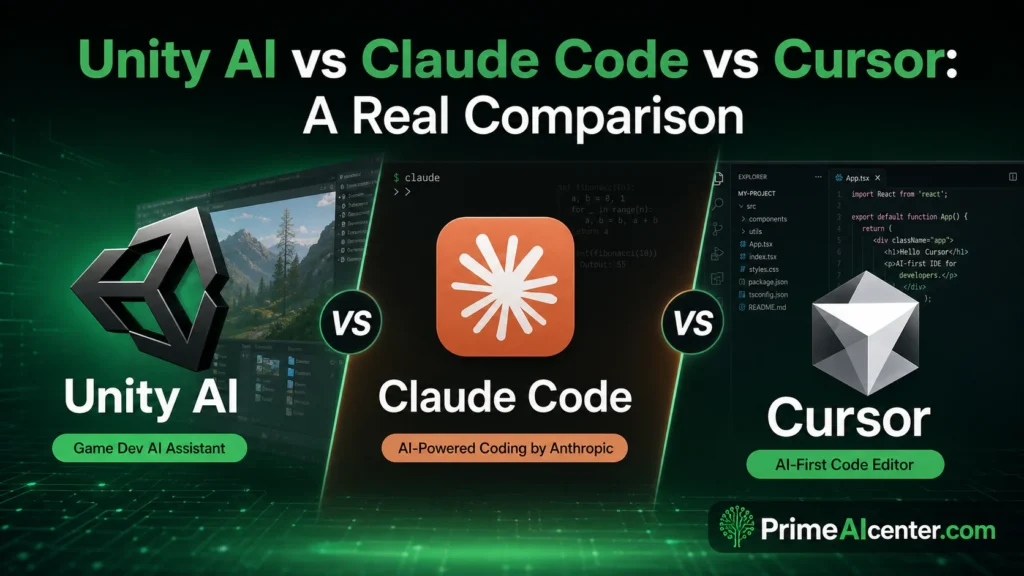
| Feature | Unity AI | Claude Code + MCP | Cursor |
|---|---|---|---|
| Project Context Depth | Native — full scene graph, GameObjects, packages | Via Unity MCP Server (external) | Codebase only — no scene graph |
| Asset Generation | Yes — sprites, textures, animations from prompts | No | No |
| Figma to UI | Yes (UI Toolkit / uGUI) | No | No |
| C# Code Quality | Good for common patterns; architectural decisions need review | Excellent — deep reasoning | Good |
| Rollback / Undo | Built-in checkpoints | Git / manual | Git / manual |
| Play Mode Testing | No — cannot simulate game input | No | No |
| Pricing | $10/mo Personal / included Pro+ | Separate subscription required | $20/mo |
| Works Outside Editor | No | Yes | Yes |
These tools are complementary, not competing. Unity AI owns the context layer that no external tool can replicate without the MCP bridge. Claude Code or GPT-based coding agents win on raw reasoning depth and code quality for complex logic. The optimal setup for a serious indie studio is Unity AI’s MCP Server connected to an external agent you’re already paying for.
What Unity AI Can Build — And What It Can’t
Unity’s promotional trailer showed a demolition derby game built from natural language prompts in seconds. That’s the ceiling, carefully selected for maximum impact. Here’s a grounded map of real capability.
What Works Well
- C# scripts for common gameplay patterns — movement, physics, UI, event systems — come out clean and project-aware
- Console error explanation is fast and specific; it references your actual stack trace rather than giving generic advice
- Placeholder 2D assets (sprites, textures) are good enough for early prototyping, not for shipping
- Prefab setup, manager singletons, scriptable object boilerplate — all significantly faster than writing from scratch
- Plan mode for complex features saves architectural mistakes before they’re in the codebase
Current Limitations (These Matter)
- It cannot play your game. Unity AI confirmed it cannot simulate user input, cannot see the Game View during Play Mode, and cannot run automated tests. You still need a QA process.
- Complex AI-generated 3D character models in the beta trailer drew immediate community criticism for quality. Artistic assets need significant review.
- Architectural decisions require human oversight. The assistant executes what you describe — it doesn’t push back on bad design patterns unless you ask it to evaluate them explicitly.
- Non-coders who generate a game and then hit a bug may find themselves unable to debug code they didn’t write and don’t understand. The learning curve issue is real.
The industry data point worth noting: median project development time across the Unity ecosystem has dropped from 91 hours to 21 hours since 2022. AI tools are clearly accelerating development. But that acceleration is in boilerplate removal and iteration speed — not in the judgment that makes a game worth playing.
Privacy and Data: What Unity Actually Stores
This matters for studios with IP concerns. Unity’s official policy: by default, user project data is used solely to provide the service and is not used to train AI models. Opt-in data sharing is available through the Dashboard, but it’s off by default.
AI-generated assets contain embedded metadata flagging them as AI-generated. Developers are responsible for app store declarations and verifying usage rights. That’s not a Unity problem specifically — it’s the current state of the entire AI asset generation space — but it’s worth building a disclosure workflow into your studio pipeline now rather than at submission time.
PrimeAI Score: Unity AI Open Beta
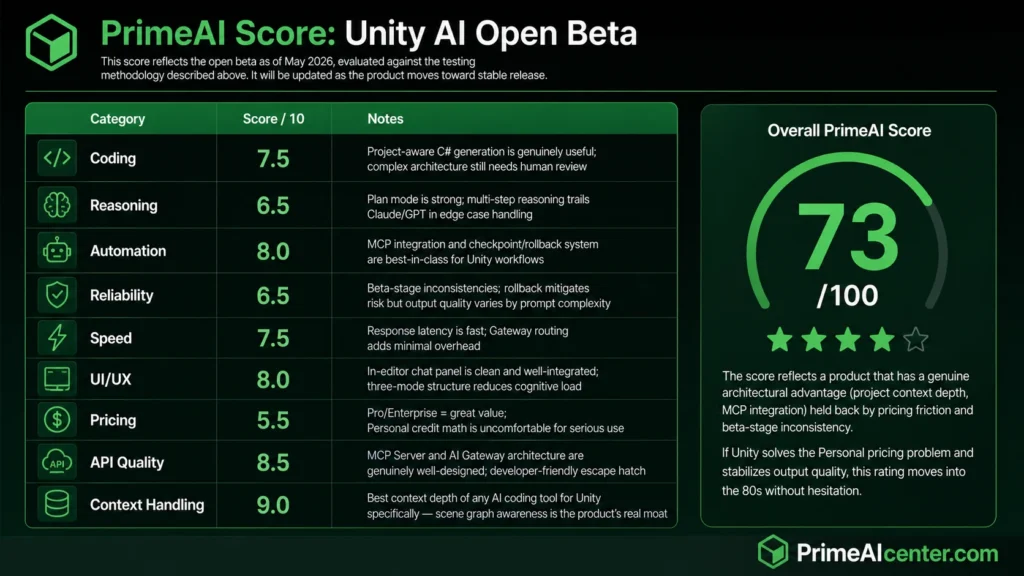
This score reflects the open beta as of May 2026, evaluated against the testing methodology described above. It will be updated as the product moves toward stable release.
| Category | Score / 10 | Notes |
|---|---|---|
| Coding | 7.5 | Project-aware C# generation is genuinely useful; complex architecture still needs human review |
| Reasoning | 6.5 | Plan mode is strong; multi-step reasoning trails Claude/GPT in edge case handling |
| Automation | 8.0 | MCP integration and checkpoint/rollback system are best-in-class for Unity workflows |
| Reliability | 6.5 | Beta-stage inconsistencies; rollback mitigates risk but output quality varies by prompt complexity |
| Speed | 7.5 | Response latency is fast; Gateway routing adds minimal overhead |
| UI/UX | 8.0 | In-editor chat panel is clean and well-integrated; three-mode structure reduces cognitive load |
| Pricing | 5.5 | Pro/Enterprise = great value; Personal credit math is uncomfortable for serious use |
| API Quality | 8.5 | MCP Server and AI Gateway architecture are genuinely well-designed; developer-friendly escape hatch |
| Context Handling | 9.0 | Best context depth of any AI coding tool for Unity specifically — scene graph awareness is the product’s real moat |
Overall PrimeAI Score: 73 / 100
The score reflects a product that has a genuine architectural advantage (project context depth, MCP integration) held back by pricing friction and beta-stage inconsistency. If Unity solves the Personal pricing problem and stabilizes output quality, this rating moves into the 80s without hesitation.
Unity AI vs Competitors: Ecosystem Context
Unity isn’t the only game engine moving on AI integration. Epic Games has its own AI tool ambitions for Unreal. Roblox has been integrating AI generation for several years at the asset level. The difference with Unity AI is the protocol-level architecture — the MCP Server means external tooling can interact with the engine at depth, not just in chat overlays.
Within the broader AI coding assistant landscape, Unity AI occupies a unique position: it’s the only tool with native access to the full Unity scene graph. That’s a defensible moat. Whether Unity executes well enough to capitalize on it is a separate question — and the developer community reaction to this beta has been skeptical enough that the execution pressure is real.
If you’re comparing coding tools more broadly, the GPT-5.5 review and the Claude Opus 4.7 breakdown cover how frontier models compare for code-heavy workflows outside the game dev context.
How to Install Unity AI: Step-by-Step
- Install Unity 6.0 or newer. Download via Unity Hub. Unity AI is strictly not backwards compatible.
- Link to Unity Cloud. Open the Unity Dashboard, create or link a Cloud project. The assistant requires cloud connectivity — offline mode is not supported in the beta.
- Open the editor and click the AI button in the toolbar. Install the Assistant package when prompted. Accept the in-editor beta terms.
- Start the free trial. 1,000 credits, 14 days. Personal users. Pro and above: access is included, install the package and you’re live.
- Test with a real task first — not a toy example. Ask it to write something you’d actually write manually. That calibrates the quality baseline faster than any documentation.
- Set up the MCP Server if you use an external IDE. Documentation is at docs.unity.com. The VS Code integration took me under 15 minutes to configure.
Full official documentation and beta participation: unity.com/features/ai
Is Unity AI Worth It? — Omar Diani‘s Take
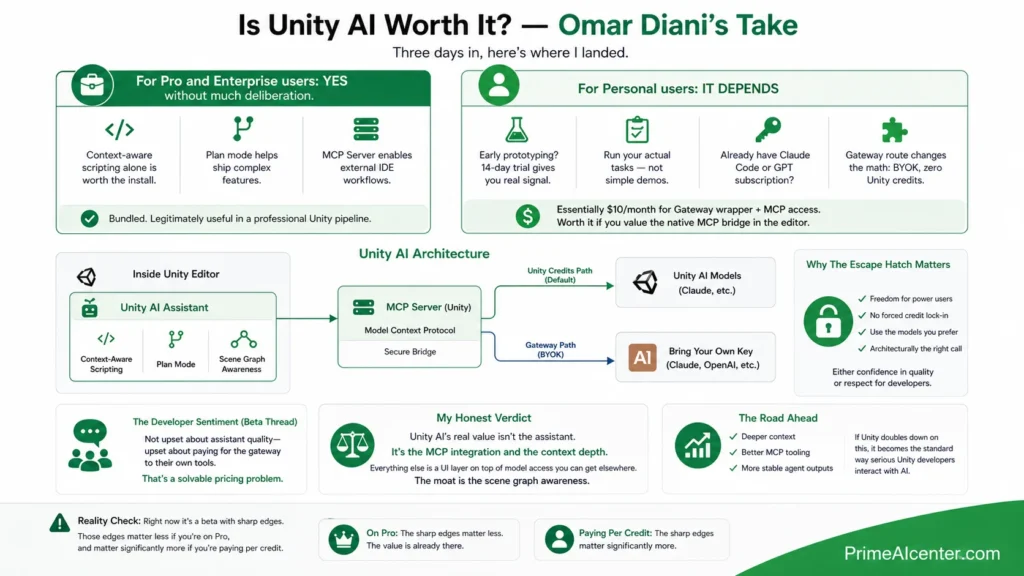
Three days in, here’s where I landed.
For Pro and Enterprise users: yes, without much deliberation. It’s bundled. The context-aware scripting alone is worth the time it takes to install the package. Plan mode for complex features and the MCP Server for external IDE workflows are both legitimately useful additions to a professional Unity pipeline.
For Personal users: it depends on what you’re actually doing. If you’re in early prototyping, the 14-day trial gives you real signal. Run your actual tasks — don’t benchmark it with simple demos. If you’re already paying for Claude Code or a GPT subscription, the Gateway route (bring your own key, zero Unity credits) changes the math considerably. You’d be paying $10/month essentially for the Gateway wrapper and MCP access. Whether that’s worth it depends on how much you value having the MCP bridge natively in the editor versus setting it up yourself externally.
The part I keep thinking about is the escape hatch. Unity built a way for serious developers to route around their own credit system. That’s either a sign of confidence — “our assistant is good enough that people won’t need to escape” — or a strategic acknowledgment that the power user segment was never going to accept a closed credit model. Either way, the MCP Server is the right call architecturally. The developer community making the most noise in the beta thread isn’t upset about the assistant quality — they’re upset about paying for the gateway to their own tools. That’s a solvable pricing problem.
My honest verdict: Unity AI’s real value isn’t the assistant. It’s the MCP integration and the context depth. Everything else is a UI layer on top of model access you can get elsewhere. The moat is the scene graph awareness. If Unity doubles down on that — deeper context, better MCP tooling, more stable agent outputs — this becomes the standard way serious Unity developers interact with AI. Right now it’s a beta with sharp edges. Those edges matter less if you’re on Pro, and matter significantly more if you’re paying per credit.
Best Alternative to Unity AI
If Unity AI doesn’t fit your workflow, the best current alternative depends on your setup:
- Claude Code + Unity MCP Server: The setup requires more configuration, but zero additional subscription cost if you already have Claude. Stronger reasoning for complex code. Described in detail at our Claude enterprise workflow guide.
- Cursor with Unity project files: Strong codebase context, no scene graph access. Best for developers doing heavy C# work who want IDE-native AI without the engine integration.
- GitHub Copilot: Lower cost, wide IDE support, weaker Unity-specific context. Works, but misses the project-awareness that makes Unity AI distinctive.
- Kilo Code: For developers wanting model-agnostic coding assistance in VS Code without platform lock-in.
Who Should Use Unity AI?
- Use it now if you’re a Unity Pro or Enterprise developer. It’s bundled, the MCP integration is production-grade, and the context depth outperforms any external tool for Unity-specific tasks.
- Start the trial if you’re a serious Personal user — but go in with real tasks, not toy prompts. Calibrate against your actual workflow before the 14 days expire.
- Wait for the next pricing iteration if you’re a Personal user already running multiple AI subscriptions. The $10/month paywall on top of external model costs is the legitimate friction point the community is pushing back on.
- Skip the in-editor assistant, use the MCP Server if you’re an experienced developer with an established external agent setup. The bridge is worth configuring regardless of whether you pay for the credit subscription.
For a broader view on how AI tools are reshaping developer productivity across the full stack, the AI workflow automation tools roundup and the best AI tools 2026 guide cover the ecosystem context Unity AI sits within.
Unity AI Open Beta Review — FAQ
When did Unity AI open beta launch?
Unity AI launched into open beta on May 4, 2026, available to all developers running Unity 6.0 or newer.
Is Unity AI the same as Unity Muse?
No. Unity Muse used Unity’s own first-party AI models and was a separate external tool. Unity AI is a new product built natively into the Unity 6 Editor using third-party frontier models, including Gemini, and supports external models via the AI Gateway.
What does Unity AI cost?
Personal users get a 14-day free trial with 1,000 credits, then $10/month for 1,000 credits per month. Pro, Enterprise, and Industry subscribers get Unity AI included in their existing seat pricing. Using third-party models via the AI Gateway does not consume Unity credits.
Does Unity AI work with older Unity versions?
No. Unity AI strictly requires Unity 6.0 or newer. It is not backwards compatible with Unity 2022 or earlier versions.
Can I use Claude or GPT inside Unity AI?
Yes, via the AI Gateway. You bring your own API key, connect it through the Gateway settings, and route requests to your preferred model without consuming Unity credits. You still need an active Unity AI subscription on Personal tier to access the Gateway.
What is the Unity AI MCP Server?
Unity’s official Model Context Protocol Server exposes the Unity scene graph to external coding agents. You can connect it from VS Code, Cursor, Claude Code, or any MCP-compatible LLM application to control and query the Unity Editor from your IDE. See our MCP protocol explainer for the technical background.
Does Unity AI train on my project data?
No, by default. Unity confirmed that user project data is used solely to provide the service. Developers can opt in to share data through the Dashboard, but the default is private.
Can Unity AI play-test my game?
No. Unity AI cannot simulate user input, cannot see the Game View during Play Mode, and cannot run automated tests. It builds and scripts; it does not play.
How many credits does a typical task use?
Unity has not published a fixed credit-per-operation table. Based on testing, simple script generation (20–50 lines) consumes roughly 50–150 credits. Complex multi-step Agent operations (scene builds, iterated asset generation) can consume 200–400 credits per session. Serious all-day development work can exhaust 1,000 credits in a single day.
Is Unity AI available on Mac?
Yes. Unity 6 runs on Mac, Windows, and Linux. Unity AI is available across all supported Editor platforms for Unity 6.0 and above.
How does Unity AI compare to Cursor for game development?
Unity AI has native scene graph context that Cursor cannot match without the MCP bridge. Cursor is stronger for pure C# development in an IDE context. The most productive setup combines Unity AI’s MCP Server with an external agent running in Cursor or VS Code. See the full comparison table earlier in this article.
What is the difference between Ask, Agent, and Plan modes?
Ask mode answers questions and explains errors without modifying your project. Agent mode executes tasks — writes scripts, generates assets, modifies components — with checkpoint rollback. Plan mode generates a structured implementation plan from a loose idea before touching any code. Plan mode is the most underused feature in the beta.