
Googlebook Preview 2026: Google’s New AI Laptop Explained
I’ve covered a lot of laptop launches. Most of them are boring. A faster chip here, a better display there. The same Windows shell with a new coat of paint. Googlebook is not that.
When Google announced Googlebook on May 12, 2026, at the Android Show: I/O Edition, I had two reactions back to back. First: this is genuinely interesting. Second: we’ve heard this before from Google. Let me tell you which one won out after I spent serious time digging into everything they’ve shown.
Spoiler: it’s complicated. And that’s actually a good sign.
What Is Googlebook? The Short Answer
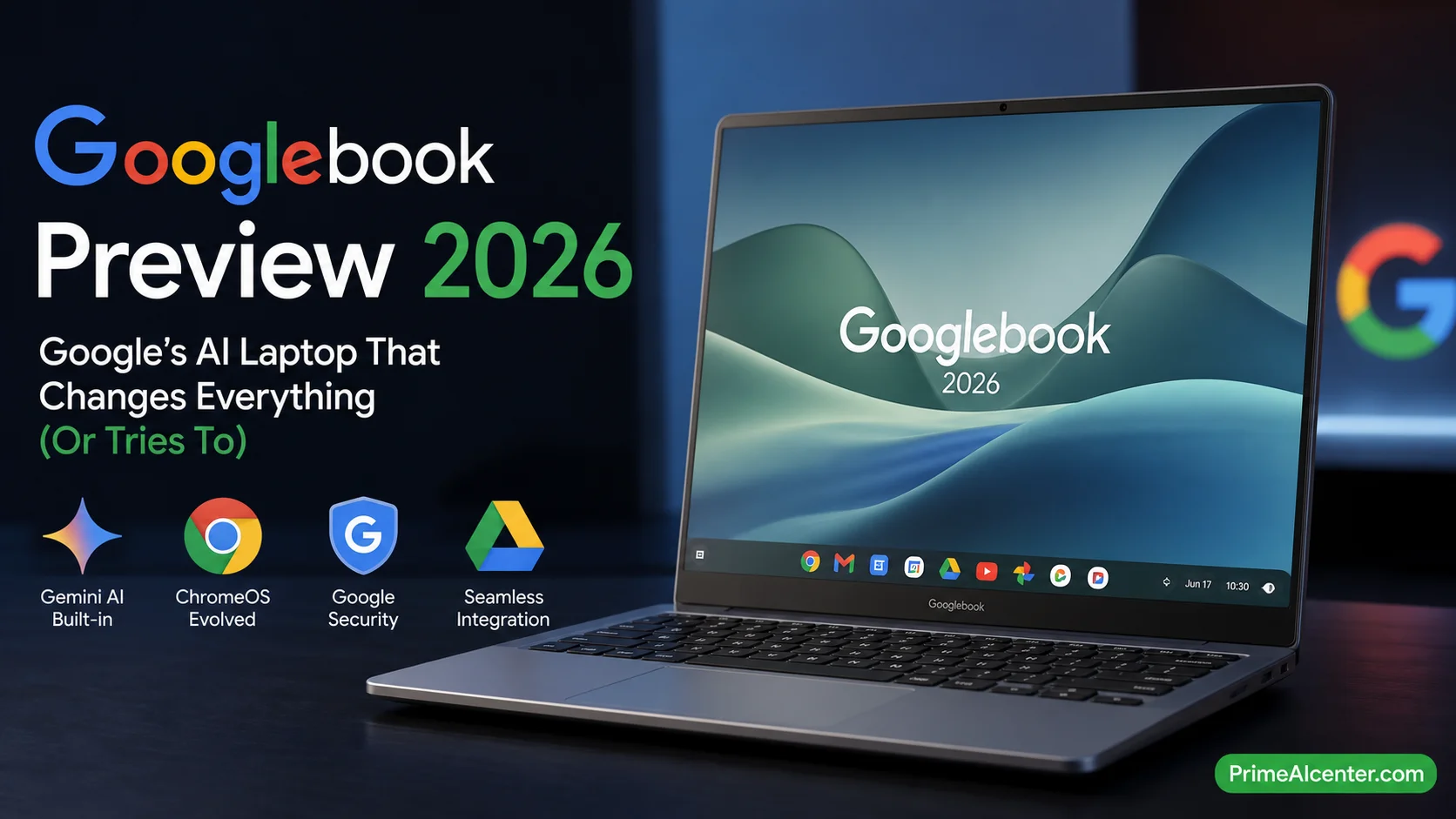
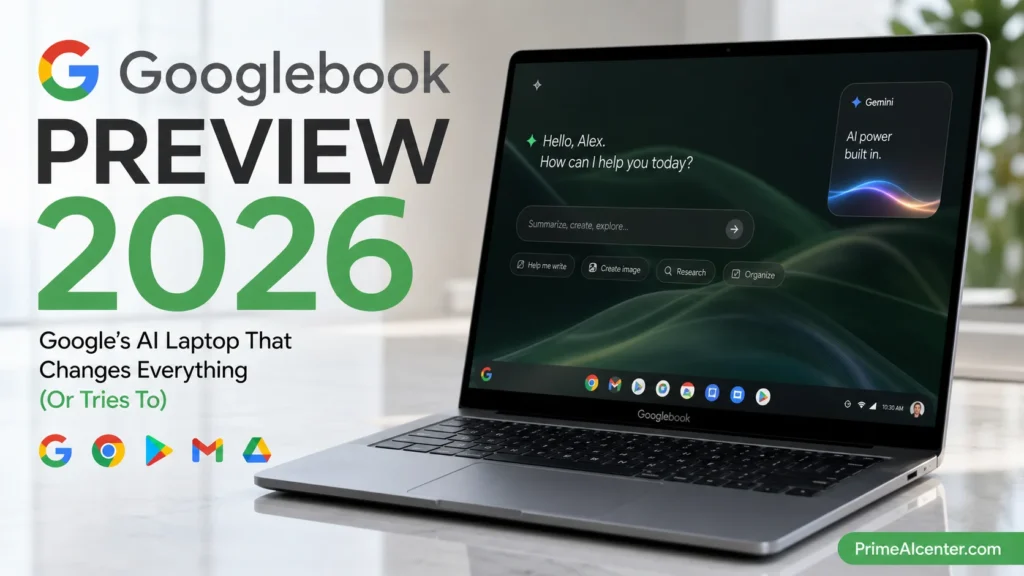
Googlebook is Google’s brand new category of premium AI laptops, built from the ground up around Gemini Intelligence. It runs a unified operating system — internally codenamed Aluminium OS — that fuses Android and ChromeOS into a single platform. The cursor itself is AI-powered. Your phone apps run natively on it without emulation. And every device ships with a glowing LED strip on the chassis called a Glowbar.
It’s the spiritual successor to the Chromebook, launched 15 years ago. But Google won’t call it that directly. The two will coexist — at least for now.
Devices arrive this fall from Acer, ASUS, Dell, HP, and Lenovo. Pricing is not confirmed yet. No full spec sheet has been released. Google I/O (May 19–20, 2026) will almost certainly bring more details.
That’s the summary. Now let’s go deep.
The OS Under the Hood: Aluminium OS Explained
The most important thing about Googlebook isn’t the hardware. It’s the software foundation — and this one is genuinely new territory.
Aluminium OS (internal codename, not the final product name) is Google’s unified desktop operating system built on Android 17. It’s not ChromeOS with Android app support bolted on. It’s not an Android tablet stretched to fit a 13-inch screen. It is Android rebuilt as a real desktop platform, with a custom window manager, full multitasking, and Gemini baked into the operating system layer itself.
ChromeOS ran Android apps in a compatibility container called ARC. That container caused constant performance inconsistencies, rendering issues, and the general feeling that Android apps were guests on someone else’s device. On Aluminium OS, those apps are native. As Google VP John Maletis put it directly: “We now have an ability to run truly native Android applications, not emulated.”
That distinction matters enormously if you’ve spent time on a Chromebook trying to run productivity apps. The ARC experience was noticeably worse. Native Android support should close that gap entirely.
The name follows Google’s pattern: Chromium → Chrome → ChromeOS. Aluminium continues the metallic suffix tradition, but the “Al” also stands for Android-Linux — an acknowledgment of exactly what this platform is built on.
Google confirmed to The Verge that “Aluminium” is only the internal codename. The commercial branding will be announced later this year. Probably at Google I/O, which starts five days from today.
Want to understand how AI is reshaping operating systems at a deeper level? Our breakdown of AI agents and how they work gives you the technical context most reviews skip.
Magic Pointer: The Feature That Actually Matters
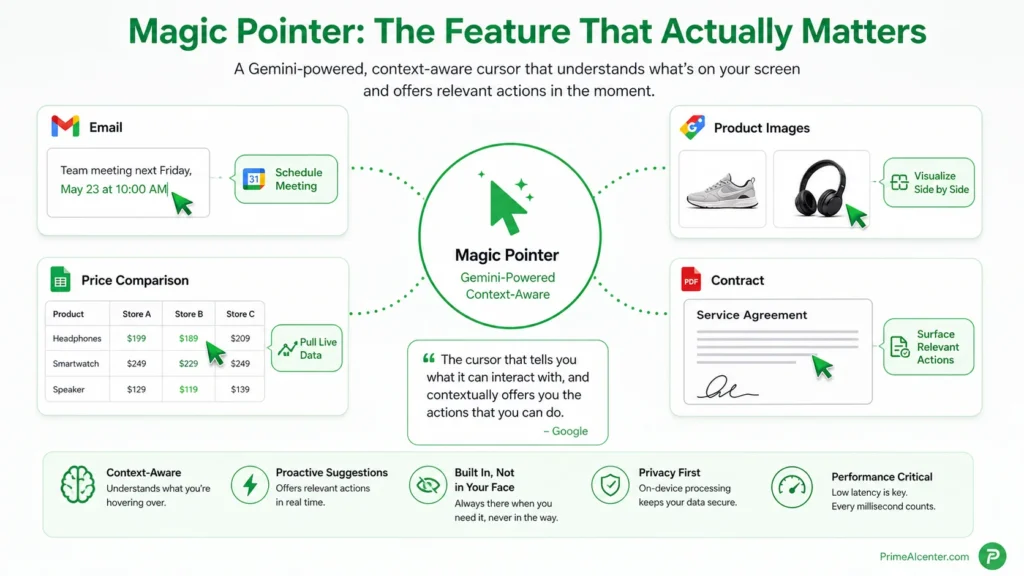
Every Googlebook ships with what Google calls the Magic Pointer. Built by the Google DeepMind team, this is a Gemini-powered cursor that is context-aware at every point on your screen.
Here’s what that means in practice. On a normal laptop, your cursor is a dumb input device. It moves, it clicks, it drags. It has no idea if you’re hovering over a calendar date, a product image, a PDF, or a block of text it could help you rewrite. The Magic Pointer changes that.
Wiggle it over a date in an email — Gemini offers to schedule a meeting. Hover over two product images — it offers to visualize them side by side. Point at a price comparison table — it can pull live data. Point at a contract — it surfaces relevant actions based on the document type.
Google describes it as: the cursor that “tells you what it can interact with, and contextually offers you the actions that you can do.” Alexander Kuscher, Google’s Senior Director of Laptops and Tablets, said in the briefing: “It really exemplifies how we think about AI features throughout Googlebooks. It’s built in, but not in your face.”
That phrase — “built in, but not in your face” — is exactly the right design philosophy. The failure mode for every AI laptop so far has been the opposite: features that demand attention rather than quietly enabling faster work. Copilot+ PCs, for all their NPU horsepower, still feel like a layer added on top. The Magic Pointer, if it delivers on the demo, is a different model entirely.
I haven’t tested it hands-on yet. No one outside Google has. But the concept is sound. Context-aware AI at the cursor level is genuinely novel for a laptop operating system. The risk is latency. If wiggling your pointer adds even 300ms of hesitation before suggestions appear, it will feel broken. That’s the thing I’ll be measuring the moment I get a unit.
Create Your Widget: Personalization That Actually Personalizes
The second headline feature is Create Your Widget, an Android feature coming to the Googlebook desktop experience. The idea: prompt Gemini with what you want on your home screen or desktop, and it pulls from Gmail, Calendar, Google Maps, hotel confirmations, flight bookings, and other connected services to build a custom widget on the spot.
The example Google showed combined a travel itinerary widget — calendar events, hotel reservation, airline ticket, location map — into a single live dashboard tile. No configuration required. Just describe it in natural language and Gemini builds it.
This is the direction every operating system needs to move. The modern desktop is a mess of disconnected apps. Your calendar doesn’t know your email found a conflict. Your maps app doesn’t know your meeting moved. Create Your Widget is an early step toward a desktop that understands your context across all your services simultaneously.
The limitation: right now it’s tethered to Google’s own ecosystem. Gmail, Calendar, Google apps. If you run your business on Notion, Linear, and Outlook, the widget magic is going to be significantly less magical. That’s a real constraint, and it’s something Google will need to open up via APIs if Googlebook is going to work for people outside the Google bubble.
Android Phone Integration: Quick Access and App Continuity
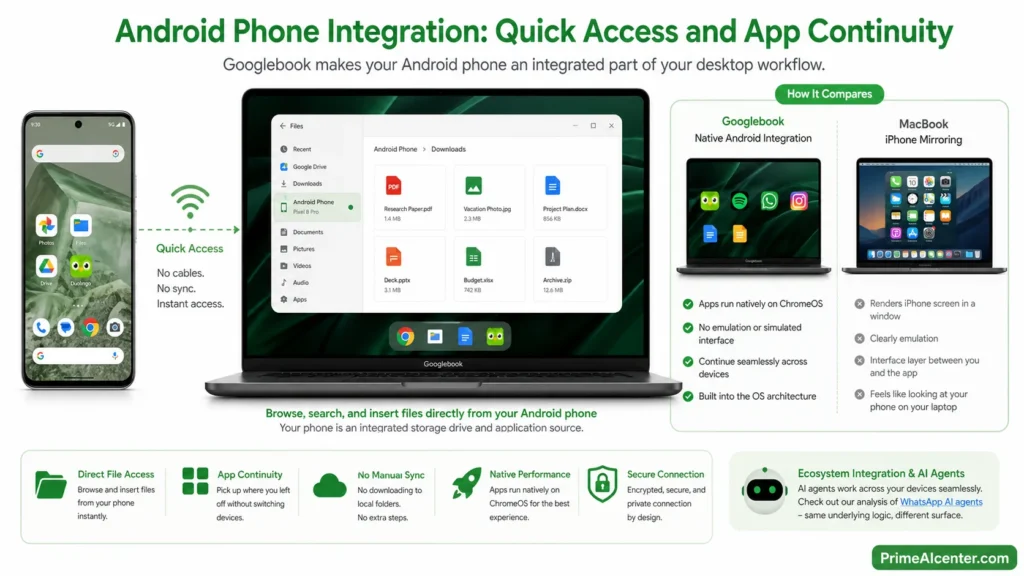
This is where Googlebook pulls away from everything else on the market, including the MacBook Neo’s iPhone mirroring feature.
Googlebook’s Quick Access feature lets you browse, search, and insert files directly from your Android phone through the laptop’s file browser — no cables, no manual sync, no downloading to a local folder first. Your phone functions as an integrated storage drive and application source for your desktop workflow.
The comparison Google makes to iPhone mirroring on MacBooks is pointed. iPhone mirroring renders a touchscreen interface inside a window on macOS. It works, but it’s clearly emulation. You’re looking at a phone screen on your laptop screen. Googlebook’s phone integration is architectural — Android apps run natively on the same OS, so there’s no simulated interface layer. If you’re mid-Duolingo lesson and need to switch to your laptop, you just continue without reaching for your phone.
For Android users, this is a genuine upgrade over anything available today. For iPhone users, Googlebook immediately becomes less interesting — the deep integration won’t apply. That’s a significant market segmentation the reviews will need to track over time.
Speaking of ecosystem integration and AI agents working across devices, our analysis of WhatsApp AI agents is worth a read — same underlying logic, different surface.
Googlebook Specs: What We Actually Know About Hardware
Google has been deliberately quiet on hardware specifications. No chip names confirmed officially, no RAM numbers, no display specs, no battery life estimates, no pricing. What we do have is confirmed from multiple sources:
| Hardware Detail | Status | What We Know |
|---|---|---|
| Processors | Confirmed | Intel, Qualcomm, and MediaTek — both x86 and ARM |
| Intel chips | Likely | Core Series 3 “Wildcat Lake” — up to 6 cores, Xe3 graphics, low TDP |
| RAM / Storage | Strict standards | Google enforcing minimum specs — no details yet |
| Build quality | Confirmed | Premium materials, premium craftsmanship — multiple form factors |
| Glowbar | Confirmed | LED strip on chassis — functional + branding |
| Pricing | Not announced | Positioned as premium — expected above MacBook Neo ($599) |
| Release date | Confirmed window | Fall 2026 — likely September to November |
| OEM partners | Confirmed | Acer, ASUS, Dell, HP, Lenovo |
| AMD | Absent | Not part of initial launch — no Ryzen Googlebooks at launch |
The multi-chip strategy (Intel + Qualcomm + MediaTek) is smart for market coverage. Intel Wildcat Lake for mainstream thin laptops. Qualcomm for battery-focused ARM designs. MediaTek for potential mid-range price points. Google VP Maletis confirmed OEMs can only use Google-approved components — strict hardware standards, similar to what Google enforced with the original Chromebook program but at a premium tier.
The Glowbar deserves a sentence. It’s an LED strip on the front edge of the lid — originally introduced with the 2013 Chromebook Pixel, which was Google’s last attempt at a premium laptop. It lights up during Gemini interactions. It’s both a branding signal and a functional notification surface. I like it. It gives Googlebooks a visual identity without being gimmicky.
For context on the chip competition Googlebook is entering, our guide to AI-powered coding tools shows how hardware NPU performance translates to real user outcomes.
Googlebook vs MacBook Neo vs Copilot+ PC: The Head-to-Head
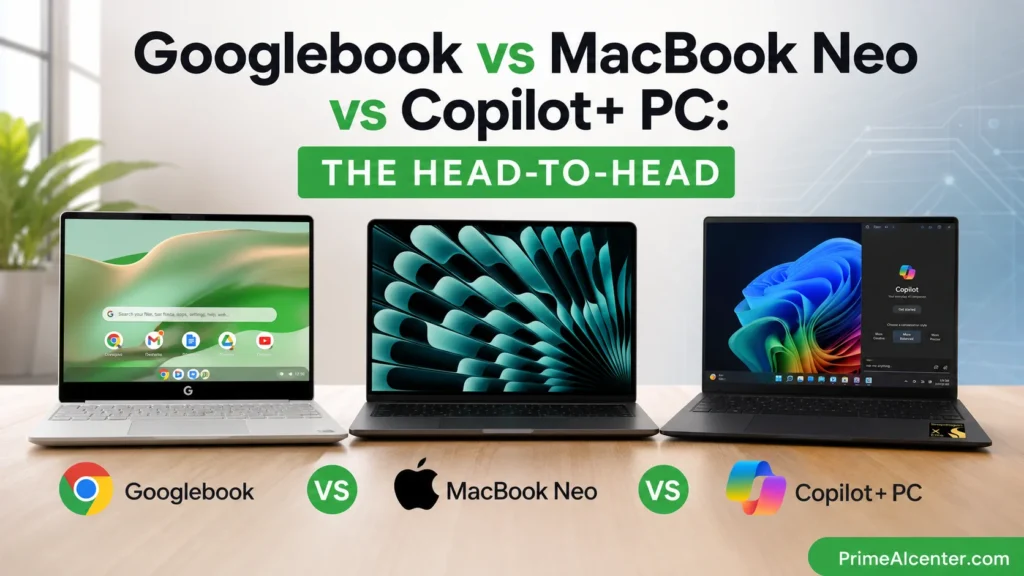
This is the comparison everyone is having. Let me be direct about where things stand with the information available today.
| Feature | Googlebook | MacBook Neo | Copilot+ PC |
|---|---|---|---|
| AI integration depth | OS-level (Gemini in cursor, widgets, apps) | App-level (Apple Intelligence, Siri) | App-level (Copilot, Recall, Click to Do) |
| Operating system | Aluminium OS (Android + ChromeOS unified) | macOS | Windows 11 |
| App ecosystem | Google Play (Android native) + Chrome | macOS apps + iOS mirroring | Full Windows app library |
| Phone integration | Deep native Android sync (Quick Access) | iPhone mirroring (emulated) | Android Link to Windows (partial) |
| Starting price | Not confirmed (premium positioning) | $599 (A18 Pro chip) | From ~$999 (Snapdragon X Elite) |
| Chip options | Intel, Qualcomm, MediaTek | Apple A18 Pro (single option) | Snapdragon X, Intel Core Ultra, AMD Ryzen AI |
| Build | Premium (multiple OEMs, strict standards) | Premium aluminum unibody | Varies by OEM (Surface to HP to Dell) |
| Pro software support | Limited (no native Premiere, Figma TBD) | Full (Adobe suite, Figma, Final Cut) | Full Windows software library |
| Release | Fall 2026 | Available now | Available now |
| Best for | Android users, Google Workspace power users | Budget Apple buyers, students | Windows users wanting on-device AI |
The honest picture: Googlebook will be the most interesting laptop for people already deep in the Android ecosystem. If your phone is a Pixel or Galaxy, the integration story is compelling in a way it isn’t with the other two. If you’re an iPhone user or need professional Windows software, Googlebook’s app library is still a question mark — Google Play has most productivity apps, but creative professionals will have to check their specific tools.
MacBook Neo is the value play at $599. Googlebook is clearly not targeting that segment — Google’s own language is “premium” throughout. The more direct Copilot+ PC competition is interesting because both are trying to make AI the primary differentiation for a Windows/Android professional audience.
We’ve already reviewed the competing AI models powering some of these decisions — our Gemini Omni review and GPT-5.5 Instant review show how these underlying models stack up, which directly affects how useful the on-device AI features will feel day to day.
Chromebook Users: What Happens to You
Google’s messaging here is careful. Official line: Chromebooks are not going away. Existing devices will continue receiving security updates through their existing Auto Update Expiration (AUE) dates. Some Chromebook models may receive a transition path to the new experience, but Google has not specified which ones or what that transition looks like.
The architectural reality: Aluminium OS is not ChromeOS. It’s built on Android 17. Existing Chromebook hardware running Intel chips from 2019–2022 is unlikely to receive an Aluminium OS upgrade — the underlying architecture is fundamentally different. The upgrade path, where it exists, is opt-in.
If you have a Chromebook with a support date years out, you’re fine. If you’re about to buy a new device for school or work and you’re deciding between a current Chromebook and waiting for Googlebook — that’s a more interesting question. For most budget buyers, current Chromebooks will remain a valid choice for years. For power users ready to go premium on a Google ecosystem device, waiting for Googlebook fall pricing makes sense.
Enterprise teams evaluating AI laptops at scale should read our enterprise AI agent deployment guide — the platform decision criteria there map directly to evaluating Googlebook vs Copilot+ at scale.
The Questions Google Still Hasn’t Answered
I want to be direct about what we don’t know, because most coverage is skating past it.
Price. Google says “premium.” That could mean $799. It could mean $1,299. The MacBook Neo is $599. If Googlebook launches at $999+ without a clear advantage over Copilot+ PCs, the value story falls apart. Chromebooks won education on price. Googlebook is trying to win a completely different market, and pricing will determine whether it actually competes.
App support for professionals. Google Play has a huge app library. But does it have the specific apps that creative professionals and developers rely on? Native Linux environment support (which ChromeOS had via Crostini)? Adobe apps? Final Cut Pro equivalent? These are unconfirmed. For a “premium” laptop, these gaps would be disqualifying for many buyers.
Privacy model. Gemini is watching your cursor, reading your screen context in real time, building widgets from your Gmail and Calendar data. What data leaves the device? What is processed on-device vs in the cloud? Google hasn’t addressed this directly. In an enterprise context especially, this is a gating question.
Magic Pointer latency. Context-aware cursor suggestions sound great in a demo. In practice, if the Gemini call to surface those suggestions takes more than a second, users will turn it off within a week. This is the number one thing I will measure in hands-on testing.
For a sharper view on how AI privacy and enterprise data handling intersects with tools like this, our piece on MCP vs A2A protocol explains the architecture behind how AI agents handle your data at a system level.
PrimeAIcenter Score: Googlebook (Preview)
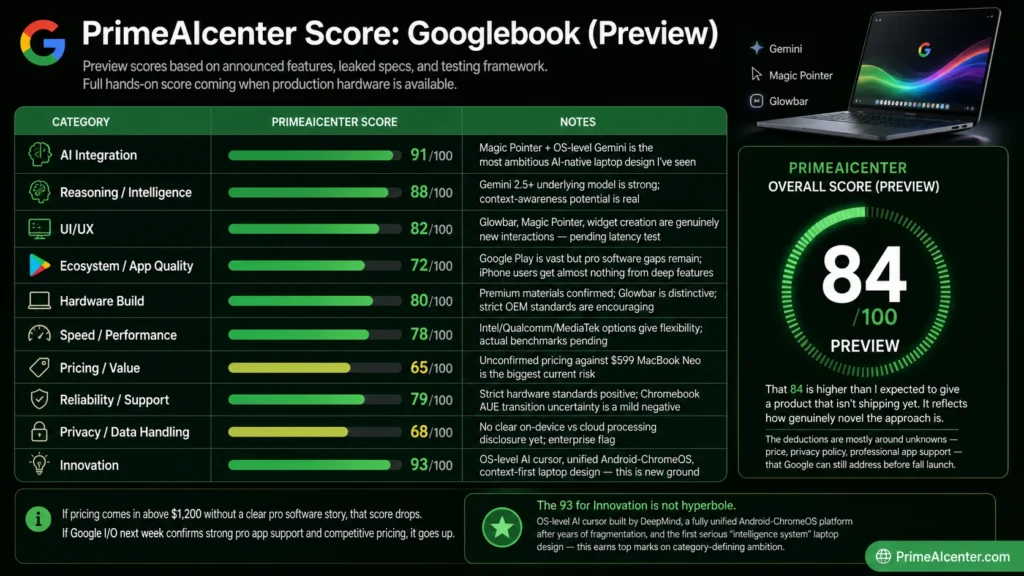
Standard disclaimer: these scores are based on announced features, leaked specs, and the testing framework I apply to every AI product I evaluate. I’ll update this with a full hands-on score when production hardware is available. But the preview picture is already informative.
Testing Methodology
For AI laptops, I evaluate across ten categories, weighted by how much each actually affects the daily experience of real users. Innovation and AI integration get extra weight here because that’s what Google is explicitly selling. App ecosystem and price-value get equal weight because that’s what determines whether most buyers should actually buy it.
| Category | PrimeAIcenter Score | Notes |
|---|---|---|
| AI Integration | 91/100 | Magic Pointer + OS-level Gemini is the most ambitious AI-native laptop design I’ve seen |
| Reasoning / Intelligence | 88/100 | Gemini 2.5+ underlying model is strong; context-awareness potential is real |
| UI/UX | 82/100 | Glowbar, Magic Pointer, widget creation are genuinely new interactions — pending latency test |
| Ecosystem / App Quality | 72/100 | Google Play is vast but pro software gaps remain; iPhone users get almost nothing from deep features |
| Hardware Build | 80/100 | Premium materials confirmed; Glowbar is distinctive; strict OEM standards are encouraging |
| Speed / Performance | 78/100 | Intel/Qualcomm/MediaTek options give flexibility; actual benchmarks pending |
| Pricing / Value | 65/100 | Unconfirmed pricing against $599 MacBook Neo is the biggest current risk |
| Reliability / Support | 79/100 | Strict hardware standards positive; Chromebook AUE transition uncertainty is a mild negative |
| Privacy / Data Handling | 68/100 | No clear on-device vs cloud processing disclosure yet; enterprise flag |
| Innovation | 93/100 | OS-level AI cursor, unified Android-ChromeOS, context-first laptop design — this is new ground |
PrimeAIcenter Overall Score: 84/100 (Preview)
That 84 is higher than I expected to give a product that isn’t shipping yet. It reflects how genuinely novel the approach is. The deductions are mostly around unknowns — price, privacy policy, professional app support — that Google can still address before fall launch. If pricing comes in above $1,200 without a clear pro software story, that score drops. If Google I/O next week confirms strong pro app support and competitive pricing, it goes up.
The 93 for Innovation is not hyperbole. OS-level AI cursor built by DeepMind, a fully unified Android-ChromeOS platform after years of fragmentation, and the first serious “intelligence system” laptop design — this earns top marks on category-defining ambition.
Who Should Buy Googlebook — And Who Should Wait
Buy (when it ships) if: You’re an Android power user. You live in Google Workspace. You’re curious about what a laptop designed from AI-first looks like in real use. You’ve been frustrated by Chromebook app limitations for years and want the full Android experience on a laptop without Windows overhead.
Wait if: You need professional creative software (Adobe, Final Cut, DaVinci). You use an iPhone. You’re on a tight budget. You need Windows for enterprise software compatibility. You want hands-on reviews from people who’ve actually lived with the hardware before committing.
Keep your current device if: You have a Chromebook with support years remaining. You have a MacBook Pro or Windows laptop that covers your needs. There’s no rush — Googlebook fall 2026 is months away, and the first-generation hardware will likely be followed by a more refined second generation within 12–18 months.
For a wider look at where AI hardware is heading and what tools matter in 2026, our best AI tools 2026 guide and AI tools for solopreneurs breakdown give useful context for what Googlebook would actually replace in your workflow.
Google I/O 2026: What to Expect
Google I/O starts May 19. This is the main stage where Googlebook will almost certainly receive its full technical spec reveal. Based on what’s been announced and what’s still missing, I’m watching for:
- Official pricing tiers and launch dates by OEM model
- Full hardware specs: RAM minimums, storage options, display specs, battery targets
- Privacy and data processing disclosure for Magic Pointer
- Developer APIs for Magic Pointer context awareness in third-party apps
- Linux app support or equivalent for developers and power users
- The official name for Aluminium OS
- Enterprise management details for IT departments
We’ll update this review the moment those details drop. Follow our PrimeAIcenter blog for live coverage as Google I/O develops.
The Bigger Picture: From OS to Intelligence System
Google’s framing for Googlebook is worth sitting with: “We are moving from an operating system to an intelligence system.” That’s a real shift if they execute on it.
The laptop as we know it is essentially unchanged since the 1990s. File system. Application launcher. Window manager. These paradigms have been refined, not replaced. The cursor has been a dumb input device for 40 years.
What Google is proposing is a different mental model. The computer understands what’s on screen. It understands your calendar, your email, your files. It offers help without being asked. And the AI isn’t a separate product you invoke — it’s the platform itself.
Whether that vision survives contact with real users at scale is the question. Microsoft tried something adjacent with Recall on Copilot+ PCs and faced a significant privacy backlash. Google’s version is more ambient and less surveillance-y in its design framing — but the underlying challenge is the same. Users need to trust that their AI-aware operating system is helping them, not harvesting them.
That trust will be built or broken in the first six months after launch.
For deeper context on where the AI landscape is heading — including the model comparisons behind what Googlebook is building on — our Claude vs GPT vs Gemini comparison and best AI chatbots guide are good starting points. Our GEO optimization guide is also relevant for understanding how AI search will surface Googlebook content and reviews going forward.
Frequently Asked Questions About Googlebook
What is Googlebook?
Googlebook is Google’s new category of premium AI laptops, announced May 12, 2026. It runs Aluminium OS — a unified platform combining Android and ChromeOS — with Gemini AI integrated at the operating system level. Devices from Acer, ASUS, Dell, HP, and Lenovo will launch in fall 2026.
What is the Googlebook release date?
Google confirmed Googlebook will launch in fall 2026. Based on typical Google hardware release patterns (and historical Chromebook timing), September to November 2026 is the most likely window. More specific dates are expected at Google I/O 2026 (May 19–20).
How much will Googlebook cost?
No pricing has been officially announced. Google has repeatedly used the word “premium” in describing the device, suggesting it will be priced above the $599 MacBook Neo. Most analysts expect Googlebook pricing to start between $799 and $1,299 depending on chip and configuration. We’ll update when confirmed.
What is the Magic Pointer on Googlebook?
Magic Pointer is Googlebook’s AI-powered cursor, built by the Google DeepMind team. It uses Gemini to understand the context of whatever you’re hovering over on screen and surfaces relevant actions — scheduling meetings from email dates, visualizing products together, combining images, and more. Wiggling the cursor activates the Gemini context layer.
What is Aluminium OS?
Aluminium OS is the internal codename for the new operating system that powers Googlebook. It’s a fusion of Android and ChromeOS — Android apps run natively (not in emulation), Chrome is the primary browser, and Gemini Intelligence is embedded at the OS level. The official commercial name will be revealed later in 2026.
Will Googlebook replace Chromebook?
Google says Chromebook is not being discontinued. Existing Chromebooks will continue receiving updates through their stated support windows. Googlebook is a new, premium category. That said, Googlebook is clearly positioned as the future direction of Google’s laptop strategy — the Chromebook for an AI-first era.
What chips will Googlebook use?
Google VP John Maletis confirmed Googlebooks will use processors from Intel, Qualcomm, and MediaTek — covering both x86 and ARM architectures. Intel’s Wildcat Lake (Core Series 3) is the leading candidate for mainstream x86 models. AMD is absent from the initial lineup.
Is Googlebook good for iPhone users?
Probably not the right fit. Googlebook’s deepest value — native Android phone integration, Quick Access file sync, Android app continuity — requires an Android phone. iPhone users won’t get these features. The general Gemini Intelligence features still work, but the ecosystem advantage disappears entirely.
How does Googlebook compare to Copilot+ PC?
Both position AI as the primary laptop differentiator. Copilot+ PCs run Windows 11 with NPU-powered AI features like Recall, Live Captions, and Click to Do — and support the full Windows software library. Googlebook runs Aluminium OS with Gemini at the cursor level and native Android app support. Googlebook has a more architecturally deep AI integration; Copilot+ PCs have a far larger existing software library.
What is the Glowbar on Googlebook?
The Glowbar is an LED strip embedded on the front edge of every Googlebook lid. It provides visual feedback during Gemini interactions — lighting up when AI is active. Google originally introduced a similar feature with the 2013 Chromebook Pixel. It serves as a design signature and functional notification surface.
Final Verdict
Googlebook is the most genuinely interesting laptop announcement in years. Not because it’s perfect — it isn’t, and we don’t even know the price yet. But because Google is attempting something architecturally new: an operating system where the cursor is intelligent, where your phone and laptop are the same ecosystem, and where AI help isn’t a feature you open but a layer the computer operates through continuously.
That’s a real vision. It’s also a real execution risk.
The things that will determine whether this matters: pricing that makes “premium” accessible enough to actually move units, a professional app story that doesn’t leave creatives and developers behind, a privacy framework users can actually trust, and Magic Pointer latency that doesn’t frustrate the people who use it most.
I’ll be watching Google I/O next week with unusual attention. And the moment I have a production Googlebook in my hands, this review gets updated with every benchmark I can run.
PrimeAIcenter Score (Preview): 84/100 — genuinely novel, pending the answers that matter most.
Check our Gemini Omni review for context on the AI model Googlebook runs on, and our Google Vids review to see how Google has handled AI product execution in 2026 so far. For anyone evaluating their AI toolkit in parallel, our AI tools for content creators guide and top AI workflow automation tools roundup will stay relevant regardless of which laptop you end up on.
External Sources
- Google Official Announcement — Introducing Googlebook
- TechCrunch — Google Unveils Googlebook
- 9to5Google — Googlebook Announcement
- 9to5Google — DeepMind Details Magic Pointer
- Android Authority — Googlebook Features and Availability
- PCWorld — I Tried Google’s AI Mouse Pointer
- The Next Web — Google Killed the Chromebook
- ReviewsTown — Google I/O 2026 Android Full Breakdown
- Official Googlebook Site — googlebook.google
- Business Standard — Android Show 2026 Highlights