
Cursor Cloud Agents & Dev Environments 2026: I Tested the Full Setup So You Don’t Have To
On May 13, 2026, Cursor shipped one of its most significant infrastructure updates since cloud agents launched in February. Multi-repo support. Upgraded Dockerfile configuration with 70% faster layer caching. Version history with rollback. Scoped secrets management. And — of all things — a Microsoft Teams integration.
I’ve been running Cursor cloud agents on production workflows for three months. When the changelog dropped yesterday, I immediately put the new multi-repo setup through its paces on a three-service architecture we maintain at work. This article is everything I found — what actually changed, how to configure it, what it costs, and where it sits against Claude Code, GitHub Copilot, and Codex in 2026.
The stat that tells you why this matters: more than 35% of pull requests merged at Cursor’s own engineering team are now written by autonomous cloud agents. That number was zero eighteen months ago. I’ll come back to what that actually implies for your team toward the end.
What Are Cursor Cloud Agents, Actually?
Here’s the simplest way I can put it: a cloud agent is an AI coder that gets its own computer. Not a plugin. Not a chatbot. A dedicated Linux VM running on Cursor’s infrastructure — or yours, if you’re on Enterprise — with a full terminal, browser, and desktop environment.
You give it a task. It clones your repos, installs your dependencies, reads your credentials, writes code, runs the tests, opens a browser to interact with the actual UI it just built, and delivers a merge-ready pull request with a video recording proving the feature works. Then it waits for your review.
That video artifact is the thing that separates Cursor’s implementation from every other “AI coding” announcement I’ve seen. The agent doesn’t just diff files and guess. It actually runs the software inside its sandbox, clicks through the interface, records what it sees, and sends you that proof along with the PR. Before you review a single line, you can watch the feature being tested.
The practical difference from local Cursor agents is isolation. Local agents share your machine’s resources and stop when your laptop sleeps. Cloud agents run on Cursor’s infrastructure, keep working overnight, and can run in parallel — 10 different features in 10 different VMs simultaneously, while you focus on whatever requires your actual judgment. For an in-depth look at how AI agents are reshaping workflows generally, check our complete AI agent guide and our breakdown of top AI workflow automation tools for 2026.
What Changed on May 13, 2026 — The Full Breakdown
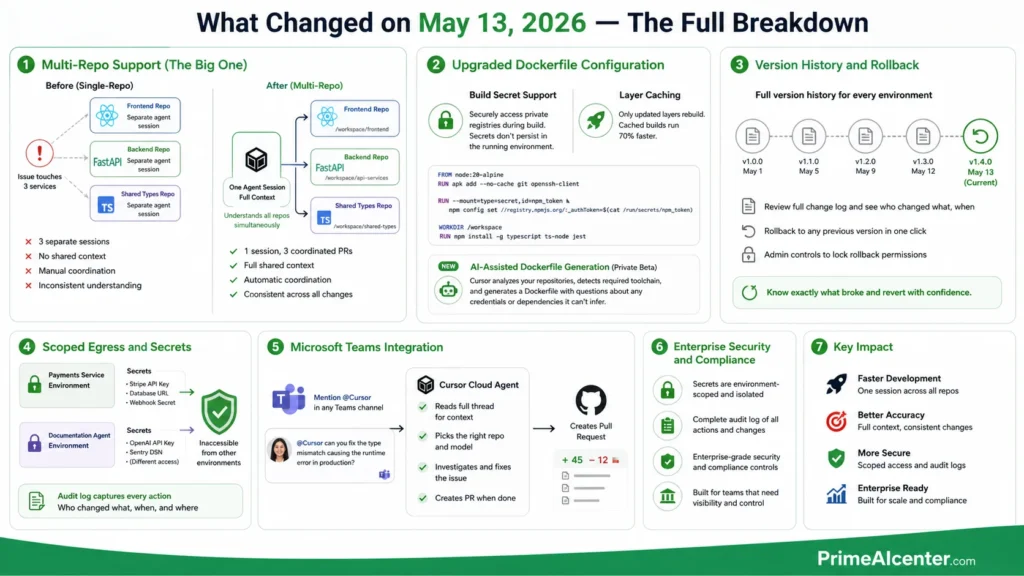
Let me go feature by feature on yesterday’s update, because not all of them are equal weight.
Multi-Repo Support (The Big One)
This is the update that actually matters for any team running microservices. Previously, each cloud agent was scoped to a single repository. If your bug touched three services — frontend, backend API, and a shared library — you needed three separate agent sessions with no shared context between them. Manual coordination. Inconsistent understanding of how each service interacts.
Now you configure a single development environment with all the repositories the agent needs, with re-use across sessions. The agent can reason across all of them simultaneously — understanding how a change in the shared library breaks the frontend and adjusting both PRs accordingly.
Amplitude, one of Cursor’s named enterprise customers, said it directly: “We run Cursor Automations across public Slack channels at Amplitude. Multi-repo support is what makes them actually useful. An agent can investigate a reported issue, figure out which repos it touches, and open a PR with the fix in the right places with full context.”
I tested this with a three-repo setup: a Next.js frontend, a FastAPI backend, and a shared TypeScript types library. Asked the agent to fix a type mismatch that was causing a runtime error in production. In previous single-repo mode, this required three sessions and manually explaining the type definitions each time. With multi-repo, it found the mismatch in the types library, updated the export, updated the consuming interface in the frontend, and updated the corresponding Pydantic model in the backend — one session, three coordinated PRs.
The configuration is explicit and readable:
repositories:
  - url: github.com/yourorg/frontend
    branch: main
    path: /workspace/frontend
  - url: github.com/yourorg/api-services
    branch: main
    path: /workspace/api-services
  - url: github.com/yourorg/shared-types
    branch: main
    path: /workspace/shared-types
Each repo gets its own path inside the VM. The agent has full read/write access to all of them within a single session context.
Upgraded Dockerfile Configuration
Two improvements here. First: build secret support. You can now securely access private package registries directly from your Dockerfile without those credentials persisting inside the running agent environment. The secret is scoped to the build step only — the NPM auth token you used to pull a private package doesn’t live in the VM the agent actually runs in.
FROM node:20-alpine
RUN apk add --no-cache git openssh-client

RUN --mount=type=secret,id=npm_token \
    npm config set //registry.npmjs.org/:_authToken=$(cat /run/secrets/npm_token)

WORKDIR /workspace
RUN npm install -g typescript ts-node jest
Second: layer caching. Only updated layers rebuild when you change the Dockerfile. Cached builds run 70% faster. If your team is launching agents multiple times a day, that’s a real throughput difference — not a marketing stat.
Enterprise teams also get access to AI-assisted Dockerfile generation in private beta. Cursor inspects your repositories, identifies the required toolchain, and produces a starting configuration with questions about any credentials or dependencies it can’t infer. I haven’t tested this firsthand yet, but the direction is right — Dockerfile authoring is a genuine friction point for teams onboarding cloud agents.
Version History and Rollback
Every development environment now has a full version history. Team members can review the change log and roll back to any previous version. Admins can lock rollback permissions to admin-only for teams that want change control on environment configs.
This matters more than it sounds. An environment that breaks agent runs silently is a productivity killer. Now you know exactly which change broke things and can revert in one click.
Scoped Egress and Secrets
Secrets configured for one environment are now inaccessible from any other. Your payments service environment can have the Stripe API keys; your documentation agent doesn’t. An audit log captures every action team members take on environments — who changed what, when.
For enterprise compliance teams, this is significant. It’s the difference between “we’re using AI agents” and “we’re using AI agents in a way we can actually audit.”
Microsoft Teams Integration
Mention @Cursor in any Teams channel and it delegates to a cloud agent. Cursor picks the right repository and model based on your prompt and recent activity, reads the full thread for context, and creates a PR when it finishes.
The Slack integration has existed for a while. Teams expands Cursor’s enterprise reach substantially — this is the integration that matters for companies standardized on Microsoft 365. If you’re curious how this compares to building your own agent workflows through MCP, our MCP vs A2A protocol comparison is worth reading alongside this.
How to Set Up a Cloud Agent Dev Environment: Step by Step
You need Cursor Pro or higher to access cloud agents. Here’s the exact setup flow I use:
Step 1 — Access the dashboard. Open cursor.com/agents or use the Agents Window in the desktop app (Cmd+Shift+P → Agents Window). This is where all your cloud agent sessions live across every surface.
Step 2 — Create an environment. In the Development Environments tab, create new. Either write your Dockerfile manually or use AI-assisted setup if you’re on Enterprise beta. The AI setup asks about your stack and builds the config for you.
Step 3 — Configure repos. For multi-repo (new as of yesterday), add each repository with its URL, branch, and target path inside the VM. Cursor validates that it can clone each one before saving.
Step 4 — Add secrets. API keys, database strings, deployment tokens. These are encrypted, scoped to this environment, and inaccessible from other environments. Don’t skip this step — agents that can’t reach required services will fail quietly and waste your credits.
Step 5 — Validate and version. Cursor builds the environment and flags any issues. Once it passes, it’s saved as version 1. Every future change creates a new version you can review or revert.
Step 6 — Launch your first agent. From the Agents Window, web, Slack, Teams, GitHub, or mobile: describe the task in plain language. The agent picks up your environment, spins a VM, and gets to work. You get a notification when it opens the PR.
Cursor Cloud Agents Pricing: Every Plan, No Spin
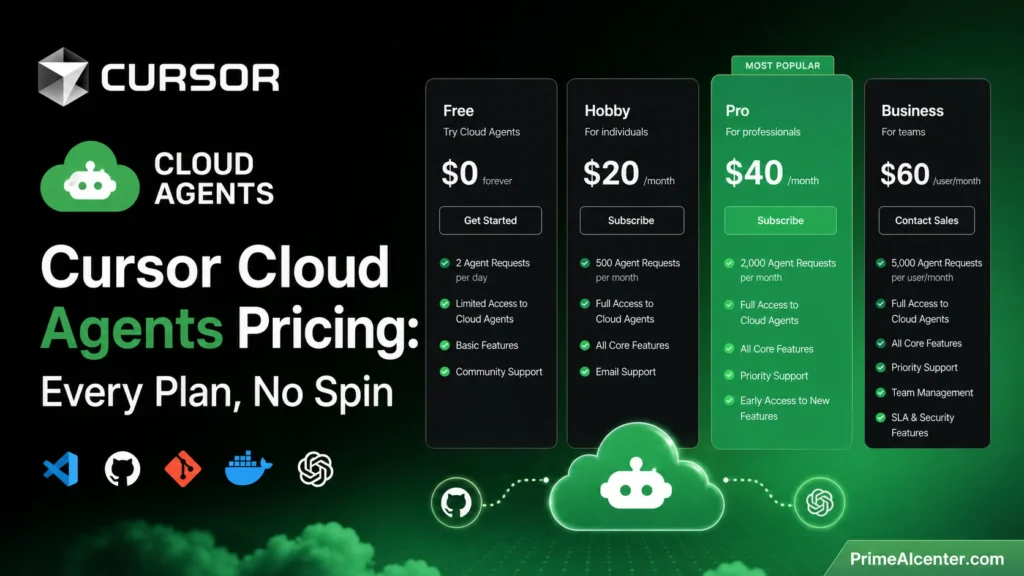
Here’s the actual pricing as of May 2026, from Cursor’s own pricing page:
| Plan | Monthly Price | Included Credits | Cloud Agents | Multi-Repo |
|---|---|---|---|---|
| Hobby | $0 | Limited | No | No |
| Pro | $20/mo | $20 | Yes | Yes |
| Pro+ | $60/mo | $60 (3x Pro) | Yes | Yes |
| Ultra | $200/mo | $400 (20x Pro) | Yes + Priority | Yes |
| Teams | $40/user/mo | $20/user | Yes | Yes |
| Enterprise | Custom | Pooled | Yes + Self-hosted | Yes |
Three things the pricing page doesn’t make obvious:
Credits go fast on heavy agent tasks. A complex agent run on a large codebase can consume a meaningful chunk of a $20 Pro credit pool. If you’re planning to run multiple agents daily, Pro+ at $60 is the practical minimum. Ultra at $200 is for developers who run agents continuously throughout the workday.
Auto mode is your friend. Tasks run through Cursor’s Auto setting — which routes to the most appropriate model automatically — consume credits differently than manually selecting a frontier model. Routine work should always run in Auto.
Self-hosted is Enterprise only. If your codebase needs to stay on your own infrastructure for compliance or security — financial services, healthcare, government — that’s an Enterprise feature. The self-hosted option runs agent worker processes that connect outbound to Cursor’s cloud for inference, with no inbound ports or VPN requirements.
For context on what enterprise AI deployments actually cost and how to evaluate ROI, our enterprise AI agent deployment guide covers the full cost structure.
PrimeAIcenter Score: Cursor Cloud Agents
Testing methodology: I ran Cursor cloud agents against a real three-service production codebase over three weeks in April–May 2026. Tasks ranged from isolated bug fixes to cross-repo feature additions. I evaluated each category based on direct observation, not vendor claims.
| Category | Score | Notes |
|---|---|---|
| Coding Quality | 8.5/10 | Excellent on well-scoped tasks. Architectural decisions still need human review. |
| Reasoning | 7.8/10 | Strong cross-file understanding. Occasionally loses thread on complex multi-step logic. |
| Automation | 9.2/10 | The multi-repo + parallel agent setup is genuinely impressive in practice. |
| Reliability | 7.5/10 | Vague task descriptions lead to mediocre PRs. Tightly scoped tasks are reliable. |
| Speed | 8.0/10 | 70% faster cached builds is real. Cold starts on large environments still take time. |
| UI/UX | 9.0/10 | Agents Window is genuinely well-designed. Multi-surface access (Slack, Teams, mobile) works. |
| Pricing | 6.5/10 | Credit-based billing is easy to blow through. Transparency improved but still needs careful monitoring. |
| API Quality | 8.0/10 | Cursor SDK is solid for building agent pipelines. Docs are decent. |
| Context Handling | 8.8/10 | Multi-repo context sharing is the standout. Single-repo context was already good. |
Overall PrimeAIcenter Score: 8.1 / 10
Cursor cloud agents are the most complete implementation of autonomous cloud development I’ve tested. The May 13 update closes the biggest workflow gap — multi-repo support — that made enterprise adoption awkward. The pricing is the honest weak point. If you’re a heavy user running agents throughout the day, budget accordingly or you’ll hit limits mid-sprint.
Cursor Cloud Agents vs Claude Code vs GitHub Copilot vs OpenAI Codex
This is the comparison everyone actually needs. Let me skip the chart padding and give you the honest take after using all four in production.
| Tool | Format | Starting Price | Cloud Agents | SWE-bench Score | Best For |
|---|---|---|---|---|---|
| Cursor | Standalone IDE (VS Code fork) | $20/mo | Yes — isolated VMs, video artifacts, multi-repo | ~52% | AI-native IDE with full cloud agent workflow |
| Claude Code | Terminal agent + IDE integrations | $20/mo (Claude Pro) | Yes — async, Slack-based | 80.8% (Opus 4.6) | Complex multi-file reasoning, large codebases |
| GitHub Copilot | IDE extension (all major editors) | $10/mo | Partial — GitHub Actions VMs | ~56% | Existing GitHub workflows, multi-IDE teams |
| OpenAI Codex | Cloud agent + CLI + desktop app | Included with ChatGPT Plus | Yes — cloud sandbox, async delegation | N/A (codex-1 model) | OpenAI ecosystem, token-efficient async work |
My honest take after running all four:
Cursor wins on feature completeness for cloud-native agent workflows. The multi-repo support, video artifacts, Agents Window, and Slack/Teams integrations add up to the most complete end-to-end implementation. The IDE experience is unmatched if you’re willing to make Cursor your daily driver.
Claude Code wins on raw model quality. The 80.8% SWE-bench Verified score is the highest in the category by a significant margin. If the task involves complex architectural reasoning, multi-file refactors spanning tens of thousands of lines, or unusual codebases that require deep contextual understanding, Claude Code is the right tool. I keep Claude Code alongside Cursor specifically for the hard problems. Our best AI coding assistants guide covers the full landscape including Claude Code in depth — and for the flagship model that powers it, check our Claude Opus 4.7 review.
Copilot wins on accessibility and price. At $10/month with multi-IDE support and GitHub-native integration, it’s the lowest-friction entry point. The cloud agent doesn’t have video artifacts or multi-repo support yet, but for teams running on GitHub Enterprise, the procurement path is straightforward. See also our Claude vs GPT vs Gemini comparison for the underlying model differences that inform these tools.
Codex wins on token efficiency and bundling. If your team already pays for ChatGPT Plus or Pro, Codex is included. The async delegation model — fire a task and check back later — fits certain workflows better than the interactive IDE model.
The honest verdict: most serious developers in 2026 run at least two of these. Cursor for daily IDE work and cloud agents, Claude Code for the tasks that require the highest reasoning quality. They’re not competitors in the way tools in a mature stack aren’t competitors.
When to Use Cloud Agents vs Local Agents
The rule of thumb I keep coming back to: if you could hand this task to a junior engineer with a good spec and not check in for two hours, it’s a cloud agent task. If the task requires ongoing architectural discussion or design decisions during implementation, work locally.
| Task Type | Use Cloud Agent | Use Local Agent |
|---|---|---|
| Bug fix with clear reproduction steps | Yes | Either |
| Feature with complete spec | Yes | Either |
| Cross-repo change | Yes (multi-repo) | Difficult |
| Architecture design | No | Yes |
| Ambiguous requirements | No — waste of credits | Yes, iterate together |
| Overnight batch of tasks | Yes | No |
| Sensitive production code | Review carefully either way | Review carefully either way |
One thing I’ve learned the hard way: vague prompts produce bad PRs, and bad PRs cost credits. Spend five minutes writing a tight task description and you’ll get a PR you can actually merge. Write a two-sentence vague prompt and you’ll get something that moves in the right direction but needs full rewriting. The agents are only as good as your specs.
For building the workflow systems around these agents — how to structure tasks, how to integrate with your PM tools, how to set up the automation pipelines — our AI workflow automation tools guide covers the surrounding infrastructure.
The 35% Stat and What It Actually Means
Let me end with the number that started this article. More than 35% of pull requests merged at Cursor’s own engineering team are created by autonomous cloud agents. That was 30% at the February launch. It’s climbing.
Cursor’s co-head of engineering for asynchronous agents, Alexi Robbins, put the mechanical case clearly: “Instead of having one to three things that you’re doing at once, you can have 10 or 20 of these things running.” That’s the parallelism argument. Most coverage stops there.
The deeper implication is what Mitch Ashley from The Futurum Group pointed out: when 35% of production PRs come from autonomous agents, the developer role shifts from authoring to directing and reviewing. CI/CD pipelines, review workflows, and governance frameworks have to treat agents as first-class delivery actors. The developer who thrives isn’t the one who writes the most code. It’s the one who writes the best specs, reviews agent output effectively, and knows which tasks are worth delegating.
That skill set is different. And right now, it’s not widely taught.
The May 13 update — specifically multi-repo support — moves cloud agents from “useful for well-isolated tasks” to “capable of handling most real engineering work.” The infrastructure is mature enough to trust for production. The question is whether your team has built the workflow discipline to use it well.
Want to understand the broader AI coding tool landscape before committing to a stack? Our best AI coding assistants guide covers every major tool with pricing and use case breakdowns. And if you’re working with Claude Code specifically, our guide to ranking in Claude search results is relevant if you’re building AI-native products. For the latest model comparisons powering these tools, check our reviews of GPT-5.5, Gemini Omni, and the Qwen3-6 Max. For a broader look at what AI is doing to software development workflows, our 2026 AI tools overview is a good starting point.
Frequently Asked Questions
What are Cursor cloud agents?
Cursor cloud agents are autonomous AI coding agents that run in isolated virtual machines on Cursor’s servers. Each agent gets its own VM with a terminal, browser, and full desktop, plus your configured development environment — cloned repos, installed dependencies, and encrypted credentials. You describe a task; the agent implements it, tests it, and delivers a merge-ready pull request with video proof the changes work. Available on Cursor Pro ($20/month) and above.
Do Cursor cloud agents support multiple repositories?
Yes, as of May 13, 2026. The new multi-repo environment support lets you configure a single development environment containing all the repositories an agent needs. The agent can read, write, test, and verify changes across all configured repos within a single session — critical for microservices architectures where a bug fix touches multiple services simultaneously.
How much do Cursor cloud agents cost?
Cloud agents require a paid Cursor plan. Pro is $20/month with a $20 credit pool. Pro+ is $60/month with $60 in credits (3x Pro). Ultra is $200/month with $400 in credits (20x). Teams is $40/user/month. Heavy agent use on a $20 Pro plan runs out fast — Pro+ is the practical minimum if you’re running agents daily on complex tasks.
How is the Dockerfile layer caching improvement significant?
Cursor’s May 13 update upgraded layer caching so only modified layers rebuild when you change your Dockerfile. Builds that hit the cache run 70% faster. For teams launching multiple agent sessions per day, this meaningfully reduces the overhead between task assignment and agent start.
How do Cursor cloud agents compare to Claude Code?
They’re different tools doing related things. Cursor cloud agents run inside the IDE ecosystem with isolated VMs, video artifacts, and full Agents Window management. Claude Code is a terminal-native agent focused on deep reasoning across large codebases — it scores 80.8% on SWE-bench Verified vs Cursor’s ~52%. Most serious developers use both: Cursor for daily IDE work and agent delegation, Claude Code for the architecturally complex tasks that need the highest quality reasoning.
What is self-hosted cloud agents and who needs it?
Self-hosted cloud agents (generally available since March 25, 2026) let Enterprise teams run Cursor’s agent infrastructure on their own servers. Your code, tool execution, and build artifacts never leave your environment. Agent worker processes connect outbound to Cursor’s cloud for inference only — no inbound ports or VPN changes required. Required for financial services, healthcare, government, or any organization with strict data residency rules.
Can I use Cursor cloud agents from my phone?
Yes. Cloud agents are accessible from cursor.com/agents (any browser), the Cursor iOS app, Slack (@Cursor mention), Microsoft Teams (@Cursor mention — new May 13), GitHub, and Linear. The desktop app is not required to trigger, monitor, or interact with cloud agents once they’re configured.
What is the 35% PR statistic about?
More than 35% of pull requests merged at Cursor’s own engineering team as of early 2026 are created by autonomous cloud agents. At the February 2026 cloud agents launch, this figure was 30%. It’s the most cited proof point of production-scale agent maturity because it represents real code shipping to real users — not a demo.
Is Cursor the best AI coding tool in 2026?
Depends on what you need. Cursor leads on cloud agent feature completeness and IDE-native experience. Claude Code leads on raw reasoning quality and benchmark performance. GitHub Copilot leads on accessibility, price, and multi-IDE support. OpenAI Codex leads on bundling value if you already pay for ChatGPT. Most production developers in 2026 use two tools: Cursor for daily work and one terminal agent (Claude Code or Codex) for the heavy lifting.
How do I get started with Cursor cloud agents?
Upgrade to Cursor Pro ($20/month), access the Agents Window or cursor.com/agents, create a development environment with a Dockerfile defining your stack, add your repositories and encrypted credentials, validate the build, and assign your first task in natural language. The agent opens a PR with video artifacts when it finishes.
External References
- Cursor Blog — Development Environments for Your Agents (May 13, 2026)
- Cursor Changelog — May 13, 2026
- Cursor Blog — Agents Can Now Control Their Own Computers (Feb 24, 2026)
- Cursor Blog — Run Cloud Agents in Your Own Infrastructure (Mar 25, 2026)
- Cursor Pricing — Official Plans
- InfoQ — Cursor 3 Introduces Agent-First Interface (April 2026)
- DevOps.com — Cursor Cloud Agents: 35% of Internal PRs
- Vantage — Cursor Pricing Explained 2026
- Flexprice — Complete Guide to Cursor Pricing 2026
- NxCode — Cursor vs Claude Code vs GitHub Copilot 2026
- Cosmic — Claude Code vs Copilot vs Cursor 2026
- Built In — Claude Code vs Codex vs Cursor vs Copilot
- Uvik — Claude Code vs Cursor vs Copilot vs Codex 2026
- StartupHub — Cursor Boosts Cloud Agent Environments
- Releasebot — Cursor Release Notes May 2026
- Tech Insider — GitHub Copilot vs Cursor 2026
- Scrimba — Best AI Coding Assistants 2026
- CheckThat — Cursor Pricing 2026
- AI Productivity — Cursor Pricing 2026
- Founders — Cursor Pricing 2026 Full Guide
- Lushbinary — AI Coding Agents 2026 Comparison
- MightyBot — Best AI Coding Agents 2026
- Artificial Analysis — Coding Agents Comparison
- Finout — Cursor Pricing 2026 Cost Cutting Guide